

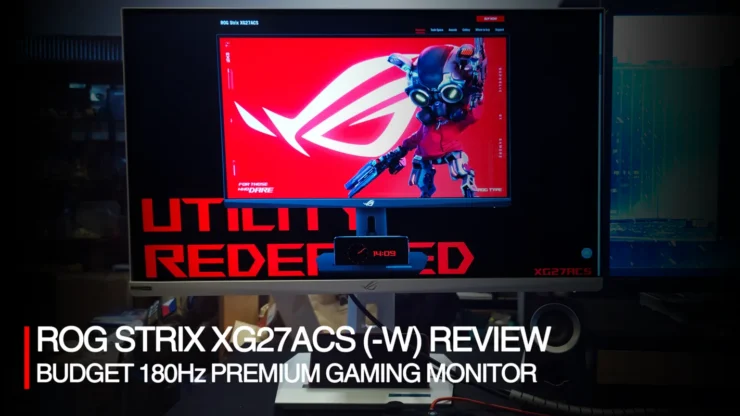
The ROG STRIX XG27ACS (and its white version, the XG27ACS-W) was released around 2 years ago, during the time when PC monitor refresh rates were upped to 180Hz. We have previously reviewed a 180Hz monitor in 2023, the TUF Gaming VG27AQ3A which preceded the XG27ACS. In this review, I’ll be looking at how the ROG STRIX XG27ACS would be a better buy for those looking to upgrade from their old 60, 75 or 100Hz monitor.
Disclaimer: I got the ROG STRIX XG27ACS-W from a raffle almost two years ago and haven’t been able to open it due to construction work of my new (now current) home/office/room. The monitor is still widely available starting at around Php 17,200.00 (PC Express). The review will be done as if I’m reviewing both colors interchangeably between white and black.
Table of Contents
ROG STRIX XG27ACS(-W) Specifications
Here is the full specifications for the ROG STRIX XG27ACS and XG27ACS-W. click on the + sign to expand the spec sheet.
| MODEL | ROG Strix XG27ACS |
| DISPLAY | Panel Size (inch) : 27 Aspect Ratio : 16:9 Color Space (DCI-P3) : 97% Color Space (sRGB) : 133% Panel Type : Fast IPS Resolution : 2560×1440 Display Viewing Area (HxV) : 596.74 x 335.66 mm Display Surface : Anti-Glare Pixel Pitch : 0.233mm Brightness (Typ.) : 350cd/㎡ Brightness (HDR, Peak) * : 400 cd/㎡ Contrast Ratio (Typ.) : 1000:1 Viewing Angle (CR≧10) : 178°/ 178° Response Time : 1ms(GTG) Display Colors : 16.7M Flicker free : Yes HDR (High Dynamic Range) Support : HDR10 Refresh Rate (max) : 180Hz |
| FEATURES | GamePlus:Yes Game Visual:Yes VRR Technology:Yes (Adaptive-Sync) Extreme Low Motion Blur:Yes DisplayWidget:Yes, DisplayWidget Center GameFast Input technology:Yes Shadow Boost:Yes ELMB Sync:Yes Aspect Control:Yes Color Calibration E-report:Yes, via DisplayWidget Center |
| I/O PORTS | DisplayPort 1.4x 1 (HBR3) HDMI (v2.0)x 1 USB-Cx 1 (DP Alt Mode) Earphone jack : Yes USB-C Power Delivery : 7.5W |
| AUDIO | Speaker:No Signal Frequency Digital Signal Frequency : USB-C, DisplayPort : 30KHz to 255KHz (H) / 48Hz to 180Hz (V) HDMI : 30KHz to 225KHz (H) / 48Hz to 144Hz (V) |
| POWER CONSUMPTION | Power Consumption : <23.1W* Power Saving Mode : <0.5W Power Off Mode : <0.3W |
| MECHANICAL DESIGN | 1/4″ Tripod Socket : Yes Tilt : Yes (+20° ~ -5°) Swivel : Yes (+45° ~ -45°) Pivot : Yes (+90° ~ -90°) Height Adjustment : 0~120mm VESA Wall Mounting : 100x100mm Kensington Lock : Yes |
| DIMENSIONS (ESTI.) | Phys. Dimension with stand (W x H x D) : 61.48 x 51.29 x 21.88 cm (24.20″ x 20.19″ x 8.61″) Phys. Dimension without Stand (W x H x D) : 61.48 x 36.71 x 6.01 cm (24.20″ x 14.45″ x 2.37″) Box Dimension (W x H x D) : 78.00 x 22.60 x 51.50 cm (30.71″ x 8.90″ x 20.28″) |
| WEIGHT (ESTI.) | Net Weight with Stand : 6.61 kg (14.57 lbs) Net Weight without Stand : 3.93 kg (8.66 lbs) Gross Weight : 10.1 kg (22.27 lbs) |
| ACCESSORIES (VARY BY REGIONS) | DisplayPort cable Power cord Quick start guide ROG pouch ROG sticker Warranty Card |
| CERTIFICATE | TÜV Flicker-free TÜV Low Blue Light VESA AdaptiveSync Display 180Hz VESA DisplayHDR 400 AMD FreeSync G-SYNC Compatible FSC MIX |
Packaging and Design: ROG STRIX XG27ACS(-W)
Around late 2023, ASUS started shifting its packaging design to use less resource intensive packaging (printed cardboard as a starter). The STRIX XG27ACS came in a simple brown box as opposed to TUF or ROG Swift series, a mark of both indicating it is a budget model, in the likes of their standard ASUS line of monitors. And the shift for ASUS to more sustainable packaging… at least for this budget ROG monitor. Other than that, however, it’s sandwiched by two Styrofoam inserts that also hold the accessory pack and stand.
Included Accessories
Accessory pack carries the power cord and Display Port cable which is roughly around 2m long. They are all contained in a zipper lined pouch, which can be repurposed as a document holder for travels (and notebook/pen) something retained under the ROG line. The power cord directly connects to the monitor and doesn’t require any external adapter/power brick. It saves on cable clutter, but it can be a bit limited on the overall length of cable.


Other stuff considered as part of the accessories kit are the manuals, certificates, warranty card, and an ROG sticker sheet. Even if this STRIX line is budget oriented, ROG didn’t forget the extras that make it one.
ROG STRIX XG27ACS(-W) Monitor and Stand Design
The monitor itself has ROG branding all around. Starting with the ROG logo on the front bezel instead of the ASUS logo found on TUF Gaming or ASUS monitors. The rear shell follows suit, with a large ROG logo at the back quarter like all other models. It is all single piece of plastic and none of the multi-layered back design found in the likes of the ROG SWIFT PG series (PG34WCDM review). It’s a consideration for having a simpler monitor design, BUT as the budget model of the ROG line, it now lacks the RGB lighting on the logo. It’s still fine, especially if you have the monitor facing a wall. But for those that have their monitors facing opposite a monitor, it’s a toss-up, you may love it or dislike it due to it lacking any visual flair ROG monitors are usually known for (especially earlier model STRIX monitors).


The monitor has a variety of connection/ports consisting of Display Port 1.4, HDMI 2.0 and Powered USB Type-C (7.5W and can be used as a display connection), and an earphone jack. There are no speakers included, but the monitor will be an audio output option in Windows and will require the use of a headphone instead for audio output. Also to note, you need either a DisplayPort cable (included) or a USB Type C to get the maximum 180Hz refresh rate. Compared to the TUF Gaming VG27AQ3A’s dual HDMI port, we’re getting more options with the USB Type C port.
Controls for the monitor retains the same ROG STRIX / TUF Gaming layout with having an all-purpose multidirectional control stick, and power, game plus and game visual buttons. It is intuitive to use, using mostly the directional controller to change settings on the monitor.
As for its stand, gone is the old tripod style foot with an ROG logo projected below. A solid two-piece stand with a flat base replaces that. It may be boring, but this reduces the footprint significantly, making it easier to place on slightly smaller tables. Because of this change however, it lost the ability to project the ROG logo (or any custom etched logo) below the base, but that’s the part of ROG’s strategy in lowering costs. The base of the stand can be used as a phone holder, given its flat design. It retains the tripod socket right on top, allowing additional flexibility in installing cameras for streaming. Similar to previous ROG STRIX monitors, the stand allows for height adjustment, tilt, swivel, and rotation, which follows the saying of “Why fix if it ain’t broken?”
ROG STRIX XG27ACS(-W) Performance Review
The ROG STRIX XG27ACS is a 27″ 180Hz* Gaming Monitor for those looking to dive into owning an ROG product at a modest price. As mentioned at the start it is priced around the Php17,000 mark and comparably based on current prices the TUF Gaming VG27AQ3A now stands at Php 13,450, taking over the TUF Gaming’s price bracket before. At an additional Php 4000, we have a Fast IPS 1440p 180Hz monitor with an ROG badge and a fully functional monitor stand. Let’s look inside the monitor.
Monitor Settings
It features several preset settings called Game Visual that convey different scenarios of using the monitor. The base default is the sRGB mode which puts multiple monitor settings to a baseline value. Like other gaming monitors from ASUS’ lineup since 2023 they consist of: sRGB, Racing, Scenery, RTS, FPS, Cinema, Scenery, MOBA, HDR and User (custom, but defaults to sRGB).
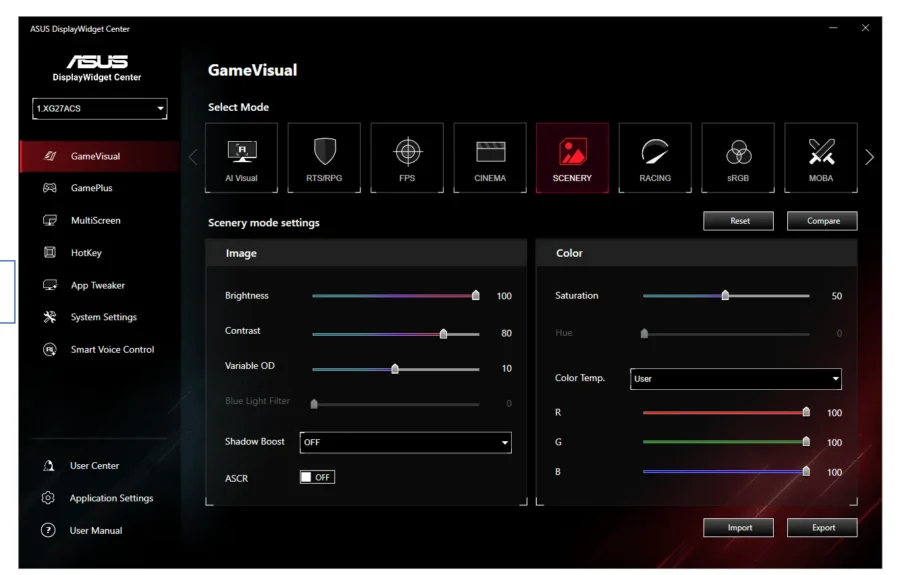
GamePlus are settings that provide additional overlaid graphics to the screen. It spans from having a more visible crosshair, timer, FPS Counter and Display Alignment.
Brightness and Panel Quality
The ROG STRIX XG27ACS comes in a well-rounded 27″ monitor size perfect for its 1440p maximum resolution (not too big or not too small). It uses a Fast IPS panel, which is the pinnacle of IPS monitors having the fastest response time (color change). It has a much brighter screen than the TUF VG27AQ3A but having the same brightness specification as the older TUF VG27AQL1A that I have been using for 5 years. On closer inspection however, on a setting of 100% brightness, the XG27ACS is actually the brighter screen.


Color Quality
Onto color (including black and white), while IPS panels have better color range than TN or VA, it certainly cannot compare to an OLED monitor. One of the issues IPS has is handling black screens as their LEDs do not necessarily go on the off state as OLED panels would have. The STRIX XG27ACS has somewhat addressed the backlight bleed effect on black screens somewhat, but still noticeable. Comparing it to the older TUF Gaming VG27QL1A does show improved backlight bleed, however.


Comparing this with the VG27AQL1A, the ROG XG27ACS has a better handle of color. It maintains a neutral white balance with just a slight bias for blues. The VG27AQL1A white balance had to be modified in its settings (or through the Display Widget App) to at least match that of the XG27ACS. sRGBA setting was used to compare their default color/brightness, while for long term use you can pick out any of the wide array of presets (I use scenery as the games I play tend to prefer brighter colors more) and then adjust their white balance to match. But overall, the ROG STRIX XG27ACS is color rich as possible, but still lacking if compared to an OLED, especially if you have used one for a while.


HDR is included with the monitor. Color is fine, but like it was mentioned with the bright and dark range, IPS monitors still suffer on blacks. It’s
Screen Refresh Rate
Finally, the refresh rate of 180Hz is a native feature (not overclocked) that is available for using the Display Port cable only (same as the TUF Gaming VG27AQ3A we’ve reviewed before) as included in the specifications sheet. With new HDMI cables that support 4k 144Hz (Ultra High-Speed HDMI 48Gbps), one would assume that using it will give a 180Hz output. Unfortunately, it requires the use of a HDMI 2.1 or 2.1b version port, which this monitor doesn’t come with (could be due to cost, as HDMI requires royalty payments).

Like the TUF Gaming VG27AQ3A before, 180Hz refresh is better for the eyes in fast paced games like FPS titles where you need to have precise vision on where your target is on screen. But there are new models out there that are faster. It does well as a replacement for those coming from 60, 75, 100Hz refresh rate monitors who game on other FPS titles that are single player like Cyberpunk or other games that benefit with less screen blurring, and health-wise higher refresh rates are better for the eyes as it reduces strain with lower refresh rates
Conclusion
ASUS made some smart decisions in curbing the price of their ROG STRIX monitors starting with the ROG STRIX XG27ACS. This led to having their premium gaming brand, ROG, to have a budget entry into the market. While it did remove some of the more “nice to have” features like RGB logo lighting, or an intricate tripod design. It stuck with having a solid monitor base, gave it a cellphone holder and kept the ability to swivel, pivot, raise the monitor’s height which is a premium feature even in the TUF Gaming lineup. The TUF Gaming VG27AQ3A stand did not have one, the higher end VG27AQL3A has it.
For the monitor’s own performance, its IPS LCD panel pushed ASUS’ Fast IPS panel technology to the maximum possible color range, made it a bit brighter and set a maximum base 180Hz speed, but only for the DisplayPort and USB Type-C ports, as HDMI has a royalty-based licensing model. It’s a reasonable compromise as most GPUs do come with DisplayPort more than HDMI.
The ROG STRIX XG27ACS is still available at varying prices online and in outlets like PC Express for around Php 17,200. There are of course newer models that have been released since, but it is very much a budget monitor from ROG, and a good one at that.