
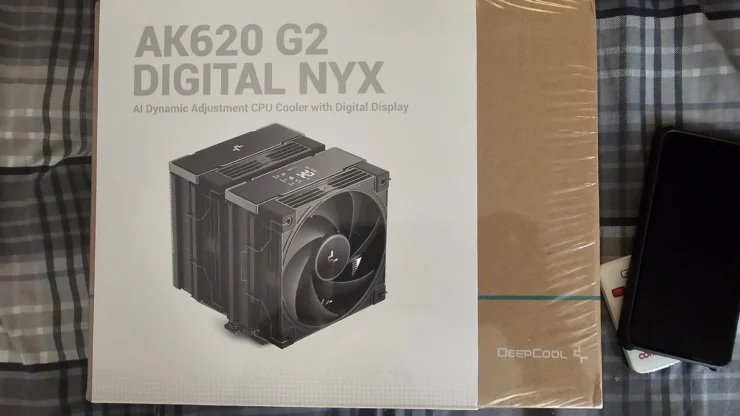
The DeepCool AK620 introduced in 2021 was a game changer in terms of performance to price. In this review, we’re covering the new DeepCool AK620 G2 Digital NYX. While other brands were able to out price it with even lower unit cost after a few months of release (Scyhte and Thermalright), the DeepCool AK620 sits somewhere in the middle only being more expensive at around $5-$10.
In between this year and its release in 2021, there were variations to the AK620 model that were released. Zero Dark, Digital, WH are just some of the variants released since its original release. The new AK620 G2 Digital (or Wood) NYX is a culmination of all of these variants combined plus some alterations or improvements.
Table of Contents
AK620 G2 Digital NYX Design


The AK620 G2 Digital NYX retains the original twin tower, 6 heat pipe design of the original. It still has the same saw tooth edged aluminum fin stack, which aids in effectively cooling the heatsink. However, this time it is powder coated in black, like the Zero Dark AK620. This gives a very clean look. An issue I found with the nickel plated or bare aluminum finish was its tendency to have dirt or fingerprints stick easily. The applied black coating lessens the tendency for dirt to stick and makes cleaning much easier.
The cooling fans included in the unit still retain the same 9 bladed fan design, but with a stronger fluid dynamic bearing motor, able to pull in more air. The design looks like the old FK series of DeepCool Fans, but closer inspection says otherwise.
Accessories included with the AK620 G2 are still the same as the original. It comes with brackets for Intel and AMD CPUs as well as their mounting screws. It includes a long L shaped screwdriver, albeit a bit of a downgrade from the ASSASSIN IV’s that came with a rubber sleeve. It still came with its own single use tube of DeepCool thermal paste. Also, it’s good to know that the AK620 and ASSASSIN IV mounting brackets have the same mounting points for each respective cooler. It reduced the need for me to swap out their mounting brackets from the PCs that I’ve fitted them on.
AK620 G2 Digital NYX Display and DeepCreative UI
DeepCool revised the display side (top) of the dual tower cooler. The previous digital design was a single piece cover that required owners/builders to remove the entire piece when installing the inner fan. This was changed to be a split design, harkening back the original AK620’s top plate design. The digital display footprint was reduced but still shows legible readings. The display not only shows the CPU temp, but CPU Usage, CPU Power and CPU Frequency (combined CPU Cores Speed). This has more information than the CH560 Digital display that the test setup is using.


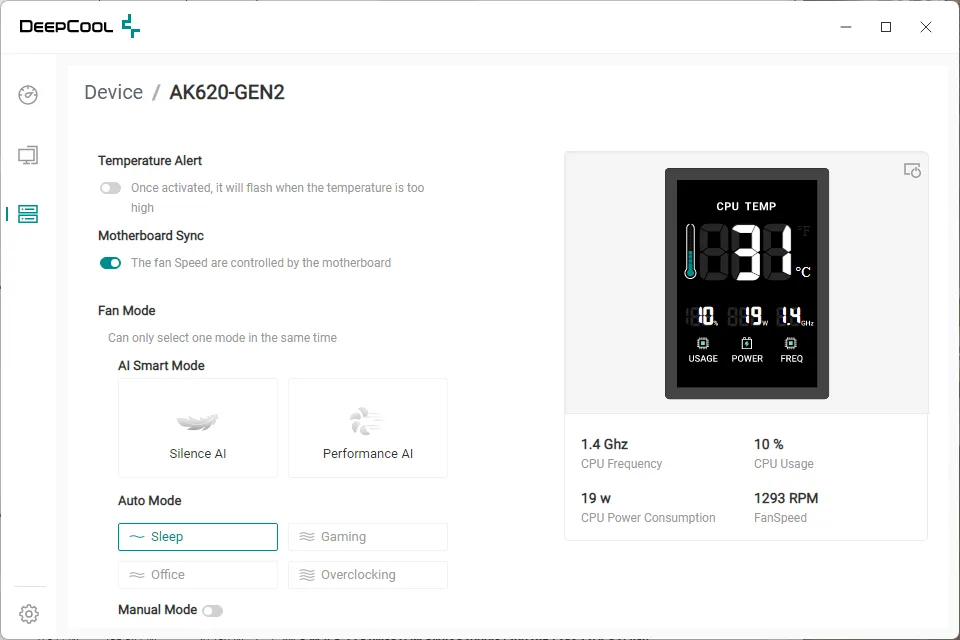
The companion application DeepCreative (requires a new version if you’re using an existing update) adds in the AK620 to the list of devices which allows for customization of the cooler’s fan settings (more on that in the performance section) and turning the display on and off. I do notice that while the display shows the aforementioned CPU speed, usage, power and temperature, the application shows the fan speed, which the display doesn’t. I would think that the display layout would permit one extra detail there
.
AK620 G2 Digital NYX Performance
To simplify this review, the AK620 G2 Digital performs well as its original model. It is able to handle the Intel Core i5 12600KF tuned to run on a 5GHz speed OC, which is the same standardized OC (outside of the more unstable 5.3GHz) for the Assassin IV VC review done previously.
The test unit is an Intel System with the Core i5 12600KF on a ROG STRIX Z790A D4 motherboard, and Thermal Paste is the Arctic MX4, to keep things standard. The fan tuning used is a custom setup that is used for an aggressive cooling and controlled by the motherboard, as the CPU is overclocked to 5Ghz. Because of the custom setup, fan noise is obvious. A noise level of around 41-43dB was taken with the case’s side cover on.
The AK620 G2 Digital tops out on the i5 12600KF at around 96 degrees maximum using Cinebench R23, while keeping an average of 83 degrees during the duration of the run. It does handle the high power and hot performance of the 12th Gen Intel CPU. This is good for this kind of CPU with a general TDP of 120W, which is quite high for a midrange CPU. To note, all fans were running at full speed, with elevated noise level of around 43dB.


But on a more normal setting of say, doing browsing or gaming, it is able to keep temperatures at a good level. The next part covers the built in AI Smart cooling modes that DeepCool introduces into the AK620 G2 Digital Nyx.
DeepCreative AI Smart Modes
The AK620 G2 Digital Nyx has its own fan setup, and it can override the motherboard’s. The DeepCool app DeepCreative has two options for AI Smart Mode: Silence AI and Performance AI. The app handles the cooling for the AK620 G2 Digital Nyx.
Using the Silence AI, it focuses on running as silent as possible, with lowering the fan’s speed to compensate for the noise. This is really good for those that run their CPUs on stock speeds and having other CPU boosting features turned on. The mode does adjust for high demands like running Cinebench 23, but I do notice that the max temp recorded is hotter at around 97 degrees and has an overall higher average temp of around 95 degrees.


Using the Performance AI Mode moves the bias a bit higher to the performance side of the fan curve. While it does still maintain a whisper quiet operation on low usage scenarios, it shines much better with higher usage as the average temp is kept at around 93 degrees and max temperature is kept at 96 degrees, same as the motherboard’s custom fan setup.


There are other conventional setups included: Sleep, Office, Gaming and Overclocking. I tried them but they all seem to have similar profiles to the AI Smart Mode, but with slightly more specific (fixed) fan curves. The AI Smart Mode adjusts the fan curve accordingly based on actual demand. Between these two, I would most likely recommend the AI Smart Mode for a more flexible adjustment of fan speeds.
Conclusion
The AK620 G2 Digital NYX does good for the line of AK620 CPU Coolers. The dual tower design remains the same throughout the duration of the model’s lifespan and no changes were made to it as it just works. It’s size now is dwarfed by the bigger ASSASSIN IV air cooler, but cooling capacity still manages to do well just enough to be performative while keeping size and costs lower. The redesigned top cover makes it easier again to install and remove the 120mm cooling fans. The display gets an upgrade to have more information shown than ever, but I did notice the fan speed showing up in the DeepCreative App, but not in the cooler’s display.
The AK620 G2 Digital NYX is currently available in the market and costs around Php 3,500++ (Depends on the store).