
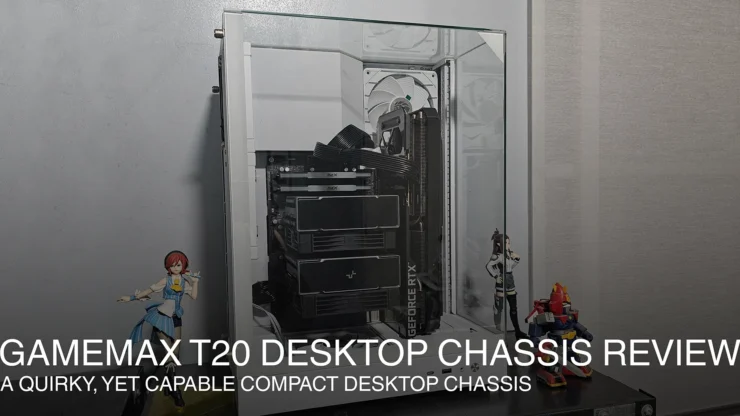
GameMax unveiled their T20 Gaming Chassis at COMPUTEX last May 2025 at their pavilion. The GameMax T20 is a somewhat quirky desktop case featuring a mATX desktop case size, but having a “dual” chamber design, while also rotating the mATX motherboard by 90o. By rotating the motherboard’s orientation, it solves one fundamental (possible) problem that desktop graphics cards face: sagging. In this review, we’ll go through this fairly unique vertical “dual” chamber style desktop case from GameMax.
Table of Contents
GameMax T20 Packaging
The GameMax T20 was shipped to my place in its own brown cardboard package, braced with a dense / thick cardboard frame for the corners. After taking of the packing tape and frame I had access to the case.

It’s secured inside the box with thick padding. The GameMax T20 sent came in white. The case comes with three tempered glass panels for the front, top and front/side. The side glass panel is the only glass part that is easily removed by the user. As for the other panels, they are affixed with adhesive to metal frames that are screwed/riveted into the case’s frame.


The accessories are all contained in a zip lock bag. These compose of several transparent zip ties, and a packet containing various screws for mounting the motherboard and power supply as well as some spare screws for the case.
GameMax T20 Physical Review
The GameMax T20 Case features a 90-degree flipped motherboard orientation, making the typical rear IO of the motherboard now be found at the bottom of the case. The T20 attempts to solve two problems of regular oriented motherboards: cable clutter at the back, and sagging graphics cards.

Chassis and Power Supply Support
The GameMax T20 only has one user removable glass panel. I think the other glass parts can be removed by screws, but might be a problem when reinstalling. The manual did not show any further teardowns for it. A metal rear (motherboard side) panel can be removed to access the area for cable management as well as installing SATA 2.5″ SSD or hard drives on a removable steel tray. Removing the steel tray permits more rear motherboard access.

The side panel and requires the removal of thumbscrews. The thumbscrews aren’t captive like other contemporary brands have, though the thumb screw’s themselves have nice nickel plating.
The rest of the case is made up of pressed sheet metal with ample thickness for rigidity. Paint is powder coated and is not easily scratched.
The T20 also tries to solve a feature of dual chambered cases have wide chassis size. To solve this, it uses an SFX power-supply to fit in a sort of 1/2 chamber. It does make the T20 as big as a desktop mATX that allows for long triple fan GPUs to fit and a full 360mm liquid AIO.

Motherboard Support
The motherboard tray for the T20 does fit an mATX motherboard, and has cut-outs for BTF motherboards, making connections very easy. There are multiple access holes for other cables that will be used for any attachment to the motherboard, if a regular mATX motherboard is used. However, I find that the access for the right-side connectors: SATA, 24pin Power, USB 3.0 Type A and USB 3.0 Type C is tight, as the cutout for passing through uses the BTF cutout. The motherboard tray has stand offs pre-installed for mATX motherboards. Installing ITX motherboards will leave some of these stand offs protruding.

The motherboard sides’ steel panel has breathing holes for the PSU and the side intake fan. Since the motherboard’s rear IO is oriented at the bottom, the T20 has enough ground clearance for regular cables to fit in (w/o the need of any 90-degree adapters).
Included Cooling Fans

Both included GameMax Tornado 120 cooling fans are reverse oriented hence the fan’s motor mount is hidden, also good call in including these fans for pulling in air. Meanwhile, we are free to install fans of our choosing at the back. It also serves as the mounting point of the liquid AIO.
“Front” IO

As for the case’s power button and IO, usually, the IO is found somewhere up on top of the case but given its design; it is found at the base of the case. We only get one USB 3.0 Type C and USB 3.0 Type A along with a power button with integrated power LED. A bit sparse but all the essentials are there.
GameMax T20 PC Build Experience
For the PC build review, I’ll be transplanting my mATX system from its open bench case. I will not be including the Liquid AIO (for now) to test how big of a air cooler can really fit, as well as how it performs in this case.

Does the mATX support hold true?
My mATX motherboard is an ASRock PG650M Riptide WiFi. The power supply used is Cooler Master V850 SFX. the Riptide snuggly fits the motherboard tray, but as mentioned earlier, you’ll have to plan where some of the cables will pass through. It’s designed more for a BTF style motherboard as the cutouts are strategically placed for that style of wiring. As I’ll cover in the Wiring and Cable Management part, there are ways to work around with wiring.
Once the entire system’s set up was complete, I noticed that there are some spaces that can be utilized further by any creative builders who can customize builds.
Graphics Card Support


For this test I used the ROG STRIX RTX 3060 12GB GPU. There’s still some space to allow even up to a RTX 5090 GPU. The top motherboard side Intake fan will push in air for the top-most fan. But if the GPU installed is shorter/has dual fans, there is a small vent at the front of the case, where the front glass and the front panel frame meet.
Wiring and Cable Management
I had no problem with how I was able to connect the Power button and Power LED cables, as well as the 8+4pin CPU power, but connecting the 24pin motherboard and PCIE power cable to the GPU I have, it was a real stretch for the CM modular power supply cable. For the motherboard I routed it through the gap where I also passed the USB3 cables before installing the motherboard (see image). For the GPU I would recommend using a PCIE extension as it gives an extra slack to the CM V850 SFX PCIE cable’s shorter length, if you want it connected from the bottom but in this case, from the front facing side of the case.

Alternatively, I found out a way which works for a single PCI cable is to pass the cable through where the PSU has a small cutout and the 24pin is situated (as seen in the image above). It won’t put stress to the cable if passing through the front side of the case. It also gives a cleaner look as well.
As for the connection of the peripheral cables (keyboard, mouse, USB dongles, HDMI/Display Port, speakers) may be a bit of a problem during the installation. It will require you to tilt the pc on its side to plug in all of them and route them through a grommeted hole. But once you’re done it will leave you with a cleaner rear with only the PSU power cable showing (you can cable tie the power cable if you choose to, as there’s cable tie loops at the back).
Cooler installation
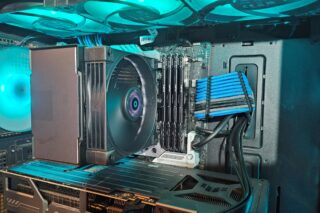
For the cooler, while I have a 240mm liquid AIO on my mATX setup, I chose to try out the new DeepCool AK620 G2 Nyx Digital to see if an air cooler of its size will fit. Since it is a digital model, the fixed display is rotated 90 degrees so it’s not actually going to look nice or reader friendly. Turning off the display of the AK620 G2 Nyx will work and reversing the orientation of the airflow from bottom to top will fix the T20’s airflow.

Adding two 120mm fans to serve as exhaust help in pulling hot air from both CPU and GPU to the rear. I did not install a third fan as it is adjacent to the intake fan, it will just draw away cold air intended for the air cooler. A full 3 fan setup is useful if using a liquid AIO to cool.

By the way, as the spec sheet says, it does fit in up to 160mm high. The AK620 G2 Nyx tops at 153mm, giving a small gap for the glass panel. It’s a snug fit for the cooler. But if it were the DeepCool Assassin IV it will still fit in too but will brush against the side glass panel.
GameMax T20 Summary
To summarize this review, the GameMax T20 is an attempt of the company to try out the 90-degree PC chassis, with some quirks. It’s an aquarium chassis the size of a compact mATX case like the old Fractal Core 1000, or Cooler Master N200 chassis, both of which I owned and built mATX systems. The interesting quirk about the system is that it manages to keep a relatively compact size while supporting large GPUs as well as 360mm Liquid AIOs (and dual tower Air Coolers).
It does support the BTF motherboards, with generous cutouts for connecting cables at the rear. But it does kind of work against regular motherboards as the need to stretch some cables like the PSUs or find a more suitable pass-through hole. The cut out from the PSU shroud is a bit small and tight for the 24pin to fit through, requiring me to finesse the cable through gaps between the motherboard and the tray.
Being an aquarium chassis, its design manages to hide the PSU, albeit compromising to use an SFX PSU instead of the standard size. It may be a deal breaker, as SFX PSUs are quite expensive, but there are certain models/brands that are relatively the same price as full sized 850W PSUs (hint, the Cooler Master V850 Gold SFX which I got at around Php 7550 at this store is the lowest priced unit). Also, we may be limited by how some SFX PSU cable lengths can be short, due to their intended use on ultra compact chassis, hence a very careful planning in cabling is needed.
The included reverse intake fans from GameMax is a nice gesture, as these types of fans are not as common, especially when included on a chassis like this. However, they could have added an additional USB Type A port at the front bottom IO Panel, as most of the accessible USB ports are now found under the chassis.
The rotated orientation of the motherboard, while fixing problems such as GPU sag or having messy cable clutter usually found at the rear still introduces some other form of challenge. As mentioned, all ports going to the PC are now found under, hence installation as well as removal may be a chore as you will need to flip it to its side in order to install/remove cables.
But what is its price? While the brand has not yet officially landed in the Philippines (though some local online stores do sell older GameMax products), the price I found in other countries has the GameMax T20 be priced at around $79.99 for the Black model and $83.99 for this white model. That is around Php 4900 or somewhere thereabouts at Php 5,500 to Php 6,000 if duties/tariffs are applied (just a guess). It’s a bit on the premium side if the add-on tariffs are in place.
By the way, when you compare the GameMax T20 to other desktop cases, then its closest option would be the recently released DeepCool CH270. It’s not an aquarium style case but follows the same 90 degree rotated motherboard approach. While this concept isn’t new, having a wider choice of this configuration and designs available like the GameMax T20 is a quirky, yet novel one.