
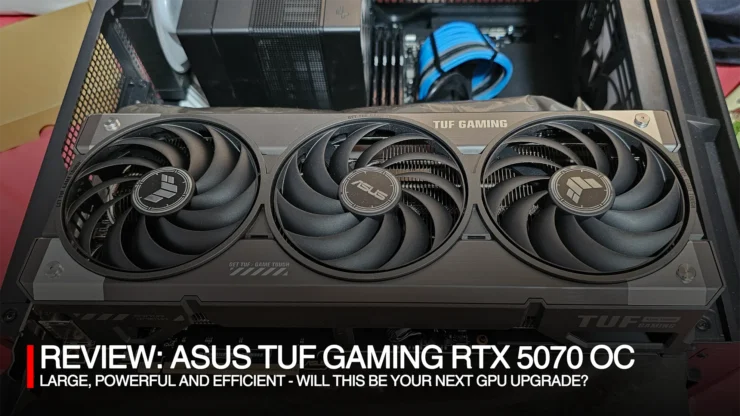
Today we’re reviewing the ASUS TUF Gaming RTX 5070 12GB OC Graphics Card, a representative to the NVIDA RTX 50 Series GPU I have on hand. On a whim right before COMPUTEX 2025 I bought this particular graphics card for several reasons: I needed a new GPU for baselining benchmark tests as the RTX 3080 I have, the RTX 3080 has made my room an oven (running on load while playing games can turn a 29-30oC ambient room to 35-38oC). the accompanying effect due to room getting hot is the need to crank up the air conditioner leading to high electric bills this past summer.
In this review, we dive into the RTX 5070 how it performs, and if it does warrant an upgrade or a must buy for you the consumer.
Table of Contents
ASUS TUF Gaming RTX 5070 OC 12GB Packaging and Design
The latest TUF Gaming GPU box now comes in a black and white box with NVIDIA’s green branding for highlights, quite a stark change from the previous releases which came in a predominantly black (with NVIDIA green) box to evoke the ‘military’ theme of TUF Gaming. But nevertheless, it still follows the military style DNA for the actual unit.
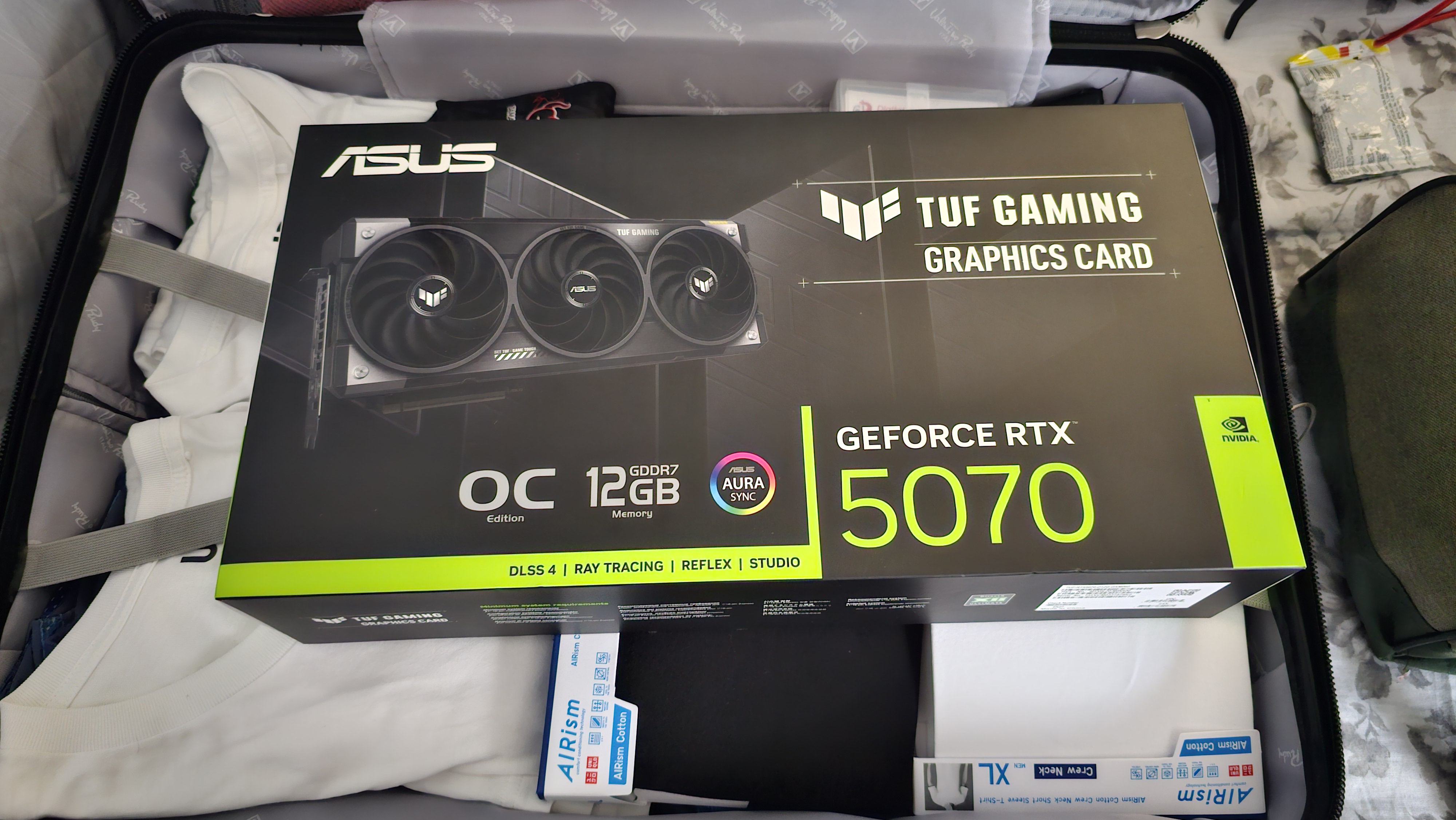
For the price I bought the unit, cash it was around Php 60,000 from PC Express last May. I went for the 12mo installment option with my credit card, and it tallied up somewhere above Php 69,000+ (around 15%, it’s a fair trade, instead of getting hammered by a full bill). So, for those looking to get it with installment be aware of surcharges. And always inquire about it with the store staff first and they will be helpful and be transparent regarding their payment schemes.
But with regards to RTX 5070 prices both in store and online, the TUF series has certainly the most expensive out there but there’s several reasons that will be made clear in the following sections. Even if RTX 5070 prices have gone down since May (it is now playing around at 52,000).
Package Contents
Inside the box we have the following: the TUF Gaming RTX 5070 12GB OC graphics card, a 12VHPWR adapter (2x PCIE 8pin connectors), a velcro strap, a GPU holder, a magnet, thank you card, and a TUF Gaming Certification and a setup manual. Gone is the old GPU collectible card, but the magnet is a nice touch.
Software Support
For software, we can download the support software for the TUF Gaming 5070 12GB OC Graphics Card from ASUS’ website. These include GPU Tweak III, and a new software from ASUS called Muse Tree, which is their home-made application for AI powered image generation, think of a stand-alone Stable Diffusion software. Of course, for the actual graphics driver, we need to get it from NVIDIA (Game Driver or Studio Driver).
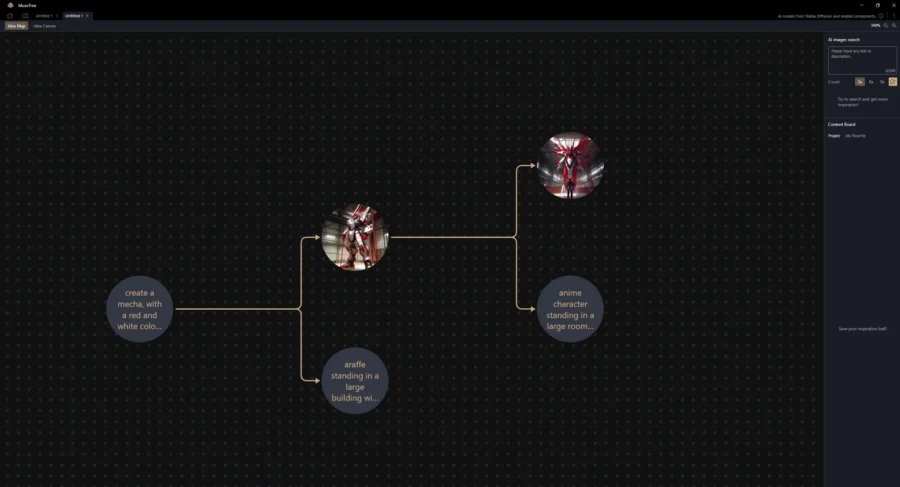
MuseTree is a nifty AI generation tool for trying out Generative AI art. You simply download the app from ASUS and follow the instructions upon installation. It required me to download AI models
TUF Gaming RTX 5070 12GB OC GPU Design
Interestingly, when looking at the spec sheet of this GPU, it’s slightly thinner than the previous TUF Gaming RTX 4070 Super 12GB OC GPU. But overall, the GPU is a whopping 3.125 slots thick to be able to pack in the massive heatsink which is roughly .5 slots thinner than the RTX 4080 or RTX 5080 TUF Gaming GPUs.
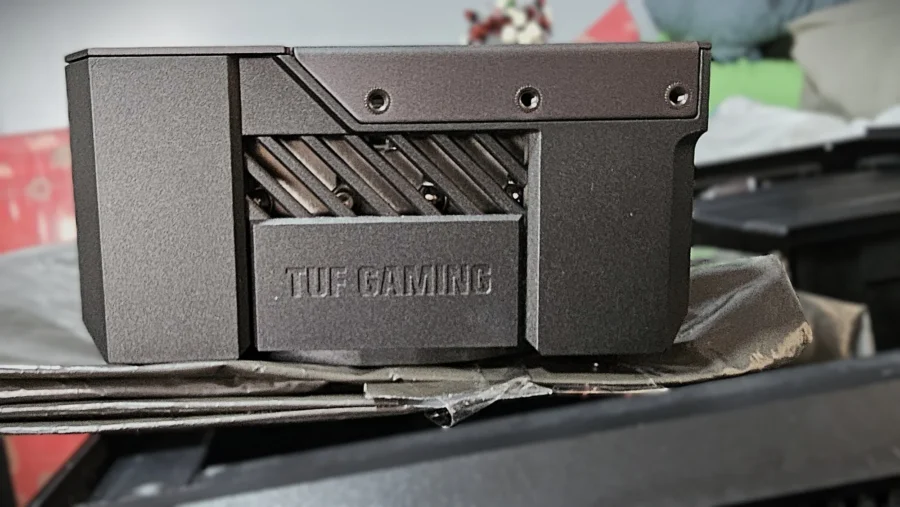
Compared to my old RTX 3080 it’s replacing, it’s thicker by .4 slots. The thickness alone would enable the RTX 3080 GPU to fit inside the RTX 5070, which is supposed to be a class lower. But TUF Gaming did not just release a run of the mill RTX 5070 graphics card. It still carries the TUF tank like design but ASUS has trimmed some of the excess bulges and keeping the overall shape as a rectangle.
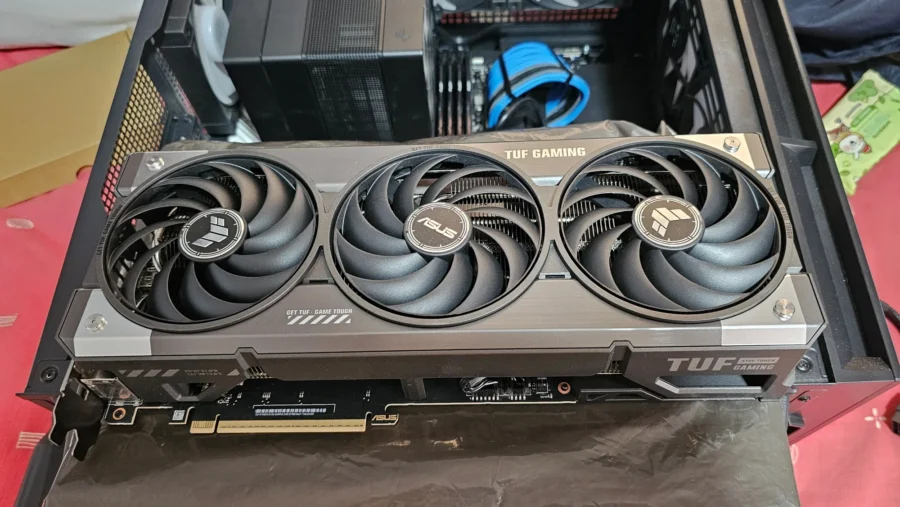
One thing I’ve liked with TUF Gaming products is the minimalistic approach to the use of RGB lighting, and in this regard, it only has lighting on one corner of the card containing the TUF logo. Another thing that was changed from previous models was the printed GeForce RTX branding text being painted gray, giving a more subtle finish, making the GPU side cleaner even with RGB lighting on.
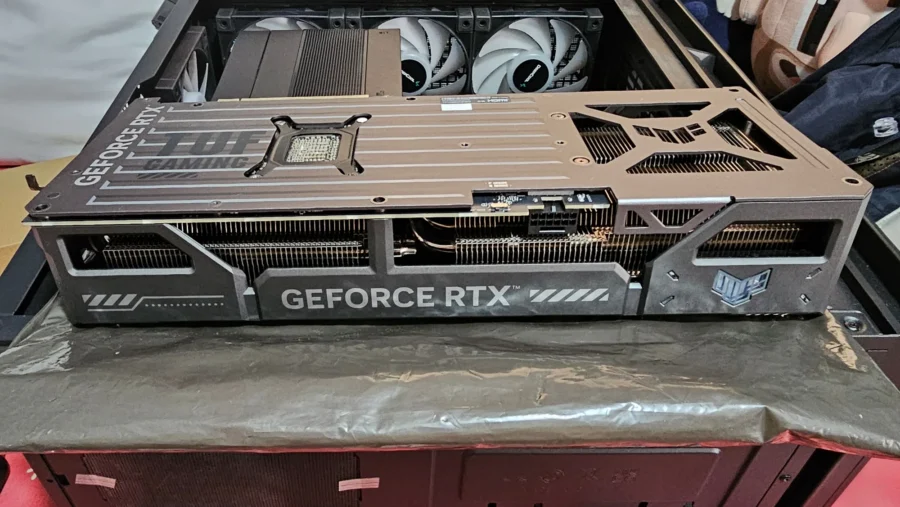
The GPU’s body shell this time makes it look like an equipment hard case that usually carry weapons or military gear. The metal backplate has some beveling and their ‘vented exoskeleton’ design for dissipating heat through the GPU. The color of the GPU still is mostly stealth gray, with some stainless-steel finishing on the fan shroud.
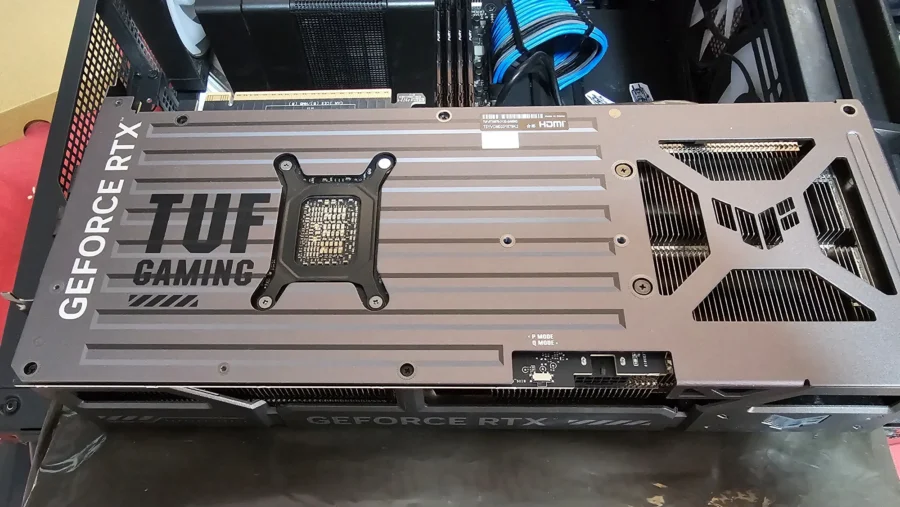
It is a triple fan design, which the middle fan spinning in a clockwise direction and the other two counterclockwise to reduce turbulence and noise. Furthermore, the system comes with a Fan-Stop feature for temperatures under 50 degrees Celsius. Even with the GPU running on load, I have not heard any fan noise off the TUF RTX 5070 12GB OC making for a very quiet system. And, because of the large heatsink used, any non-gaming or rendering task will mean that the GPU will not use the fans and can manage light GPU tasks without ever turning on.
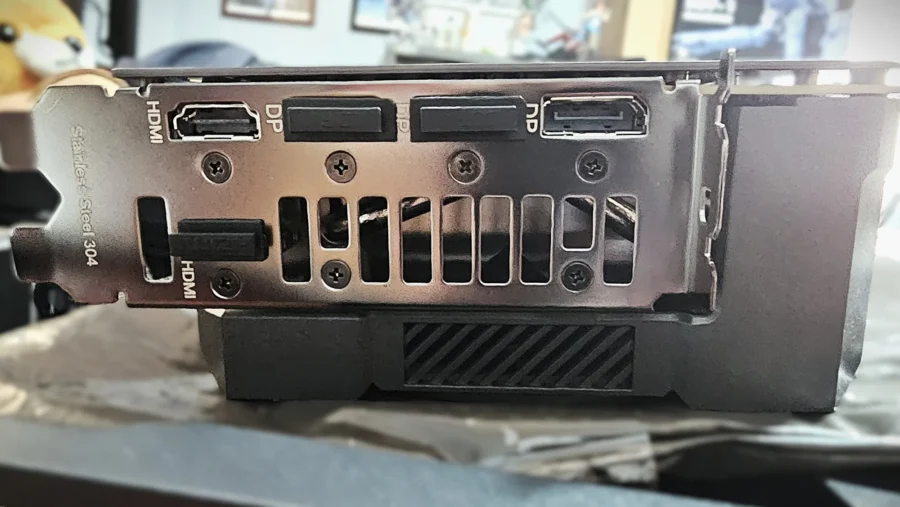
Like other TUF or STRIX (or even Prime/DUAL) GPUs that came before, the TUF Gaming RTX 5070 OC comes with a dual BIOS switch for silent and performance modes. The advantage on this setup is the flexibility and backup of a secondary BIOS in case one fails aside from having two profiles, though it can certainly spell an additional cost to the overall GPU. And for interface, it has support for two HDMI 2.1b, and three DisplayPort 2.1b ports.
Performance Testing
For performance test, I’ve tested the TUF RTX 5070 OC on several games and apps to see how it stacks to several GPUs that I’ve tested the past few years. I’m interested in how it stacks against the RTX 4070 Super, the RTX 3080 10GB, and the TUF Gaming RTX 4080. By comparing them directly I can surmise how each generation was able to improve and how big of a dent each generation has done to PC budgets to performance.
Test Machine Specs:
- CPU: Intel Core i5 12600kf (running on ASUS AI Overclock)
- Motherboard: ASUS ROG Z790A D4 Motherboard
- RAM: Kingston Fury Beast DDR4 3600 cl17
- Power Supply: Seasonic Prime 850W Gold Full Modular
- Cooling: DeepCool Assassin IV
- Monitor: TUF Gaming VG1A1QL1A 27″ running at 144Hz
Artificial Tests: 3DMark Tests
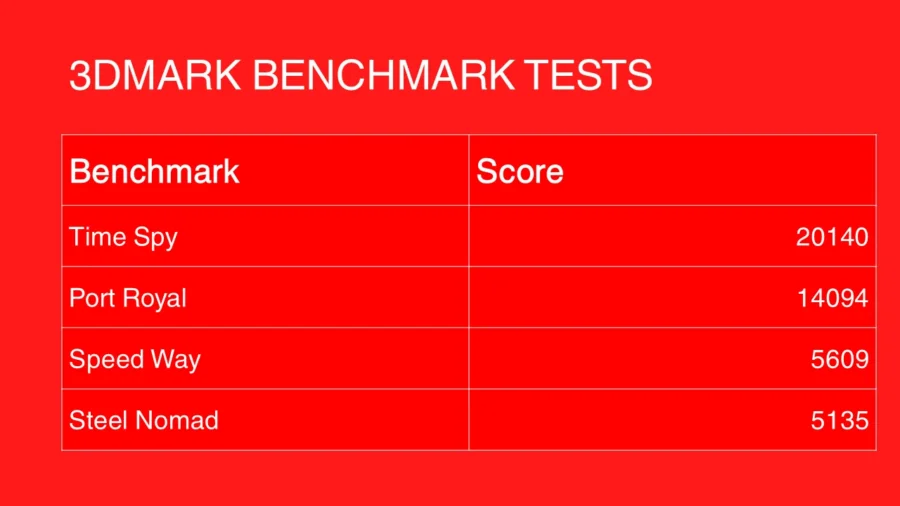
The definite go to tool/app for testing a GPU’s performance, here are the results for the TUF Gaming RTX 5070 OC. The tests conducted covered: TimeSpy, Port Royal, Steel Nomad, and Speedway. In these tests, the TUF Gaming RTX 5070 OC is able to show how well it has progressed from the RTX 30 series’ RTX 3080 beating it especially on ray tracing-based tests.
Gaming Tests
Overall, the RTX 5070 whips the older GPUs in all of the tests, however, closer inspection of logs I’ve recorded in CapFrameX is that for the RTX 50 series, the Intel Core i5 12600kf has started to hit bottleneck territory. While at lower resolutions, it’s more prevalent, on higher resolutions things balance out and bottleneck is reduced.
Cyberpunk 2077
Cyberpunk 2077 continues to be my go to for testing GPU performance, as its code focuses more on the GPU than on the CPU’s performance. With that said, here’s the comparison between the TUF Gaming RTX 5070, the RTX 3080 and RTX 4070 Super.
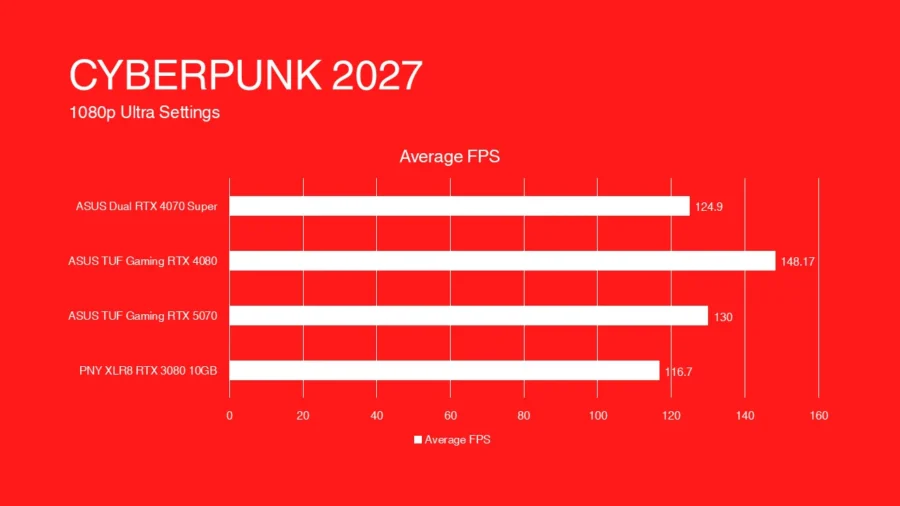
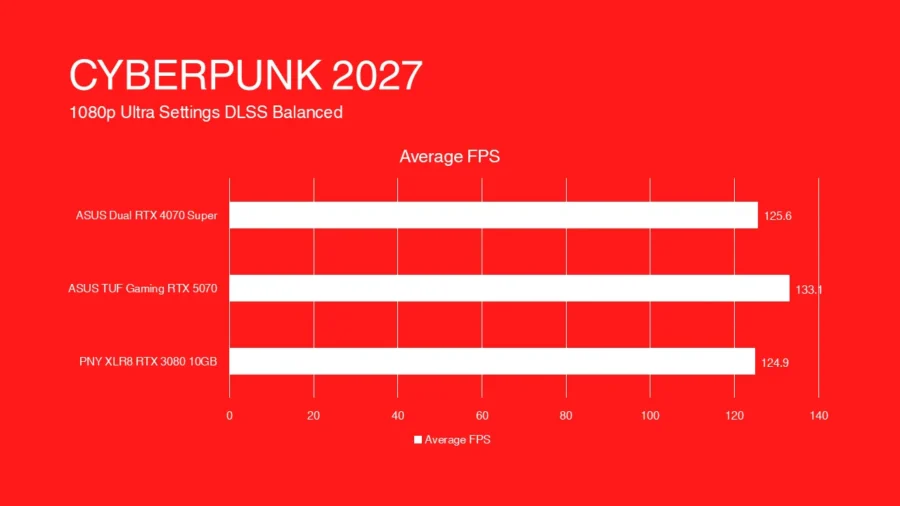
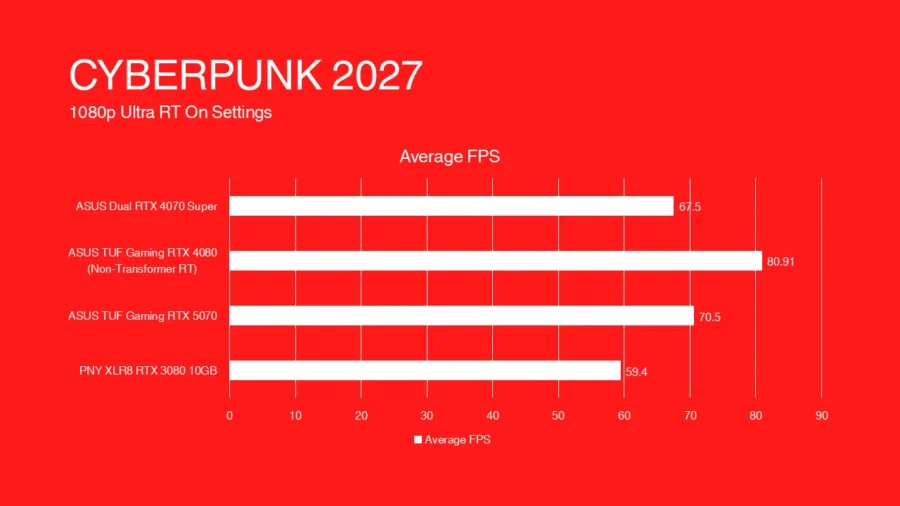
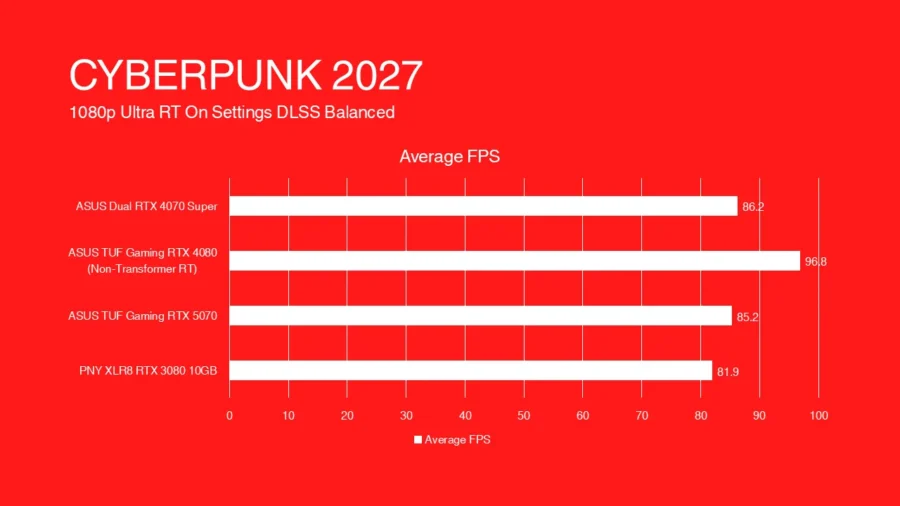
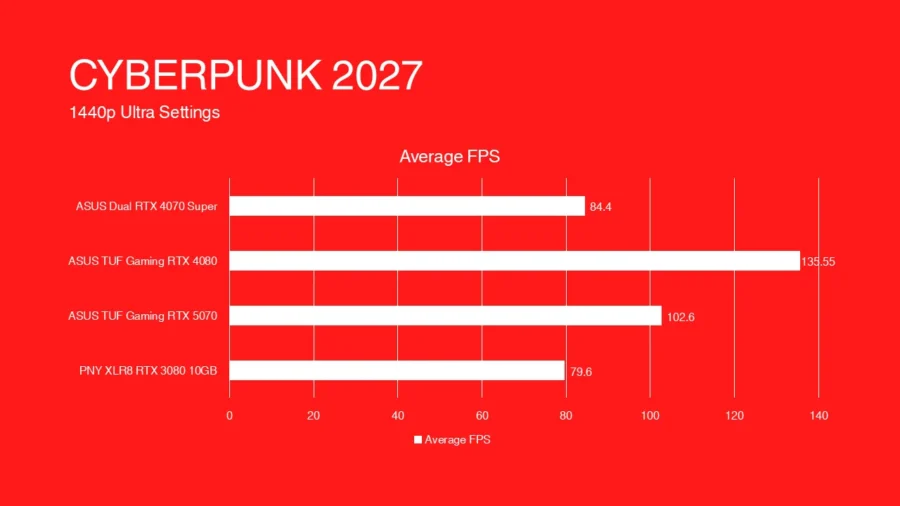
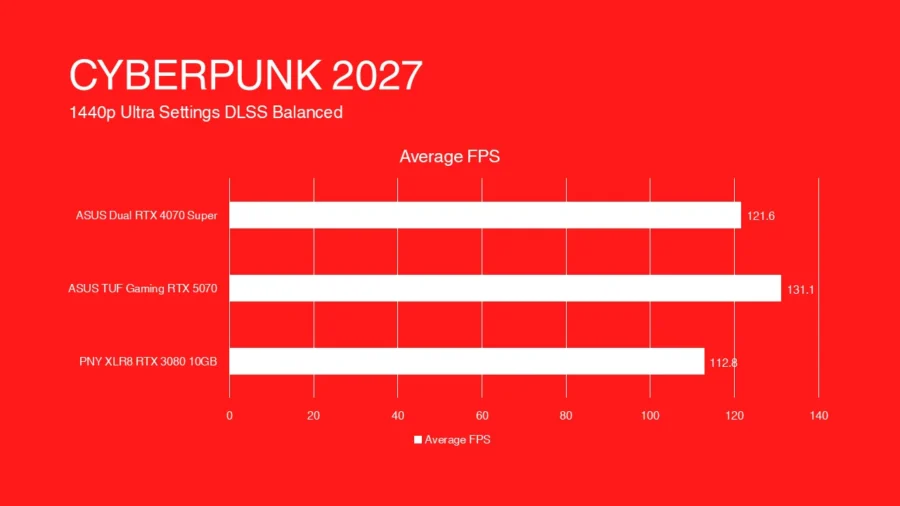
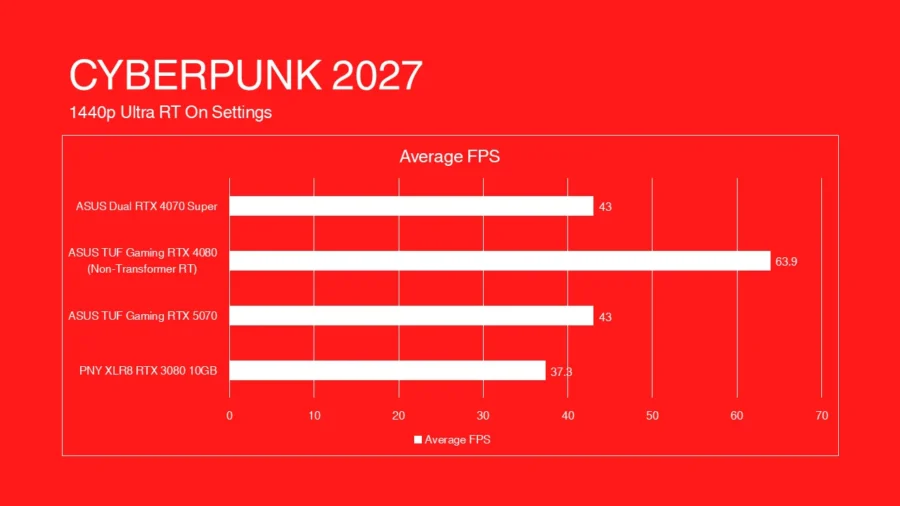
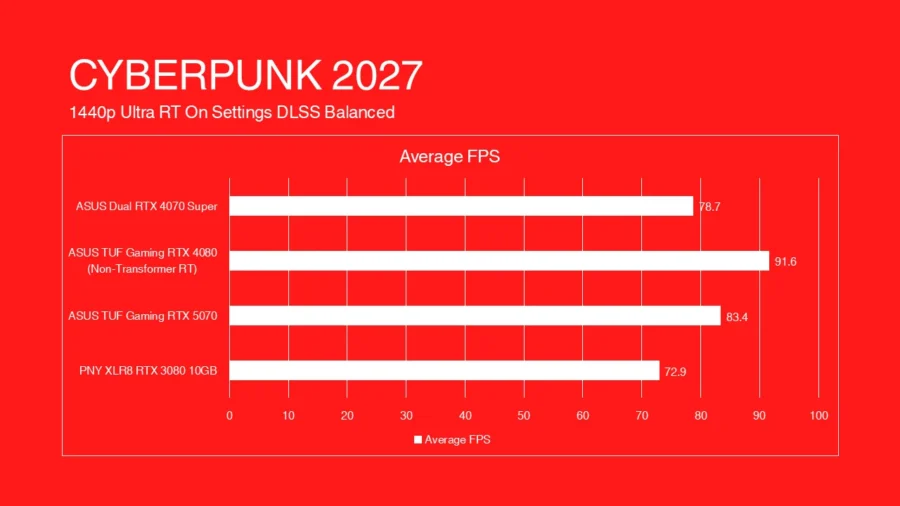
Comparing it to the RTX 4080, the older upper model spec GPU still holds better than the RTX 5070, having around 30FPS+ difference between the newer GPU and the upper tier model. It can be said the RTX 4080 is aging quite well but remember that the TUF Gaming RTX 4080 reviewed years ago was around Php 110k retail, almost double that of the TUF Gaming RTX 5070 for this review or almost triple for any other RTX 5070 model out in the market today. The RTX 4070 Super trails behind the RTX 5070, by just a small amount.
Counter Strike 2
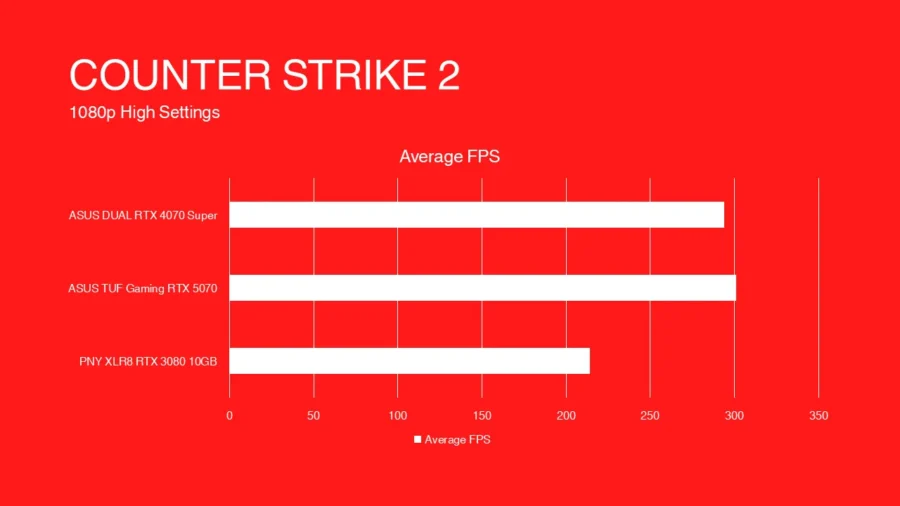
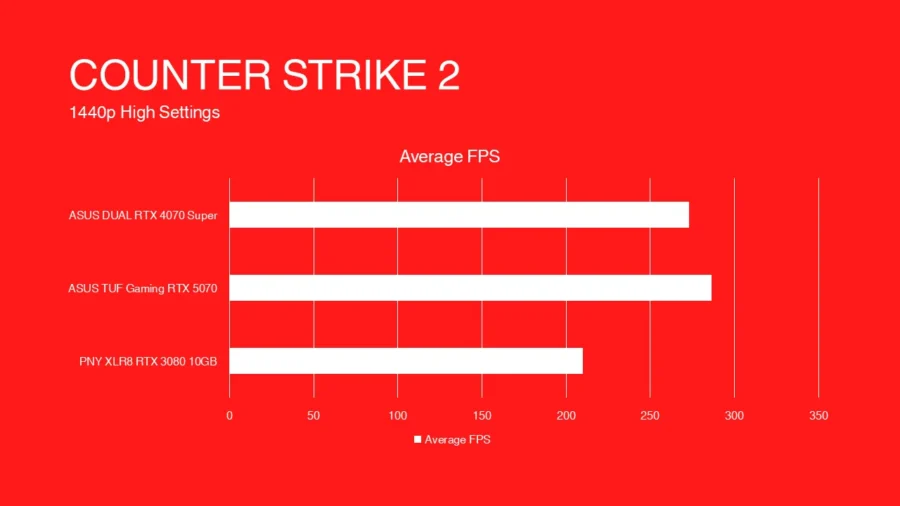
Counter Strike 2 (or the latest version of CS:GO that uses the newer graphics API like DirectX 11) is a general staple for benchmarking. But while the game is using the latest API, it’s still heavily grounded with CPU use, hence a lower total FPS score across the board as I’m using the 12th Gen Intel Core i5 12600kf.
Forza Horizon 5
Forza Horizon 5 is a racing game from Microsoft Studios that focuses on arcade style of racing and uses a lot of graphics technology for all types of graphics cards (DLSS, FSR, XeSS for NVIDIA, AMD, Intel respectively). We’ll see how the RTX 5070 handles the game and how it compares to RTX 3080, RTX 4070 Super.
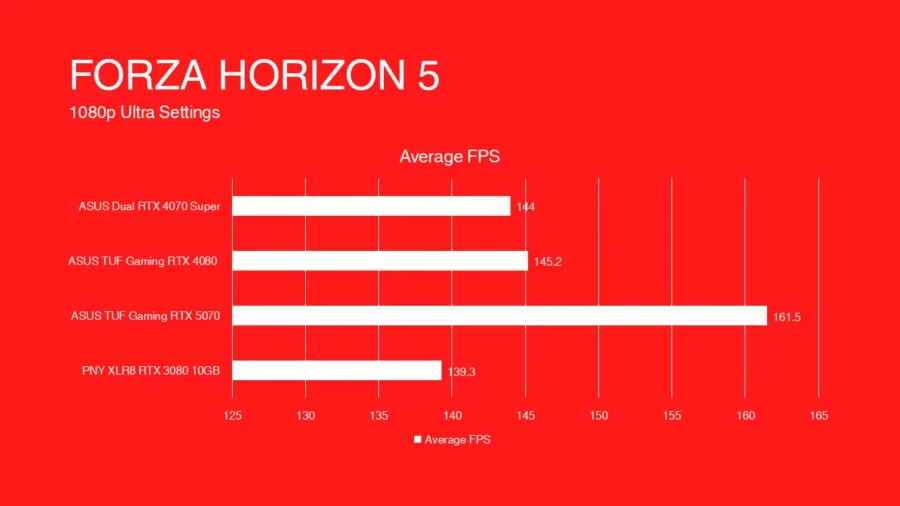
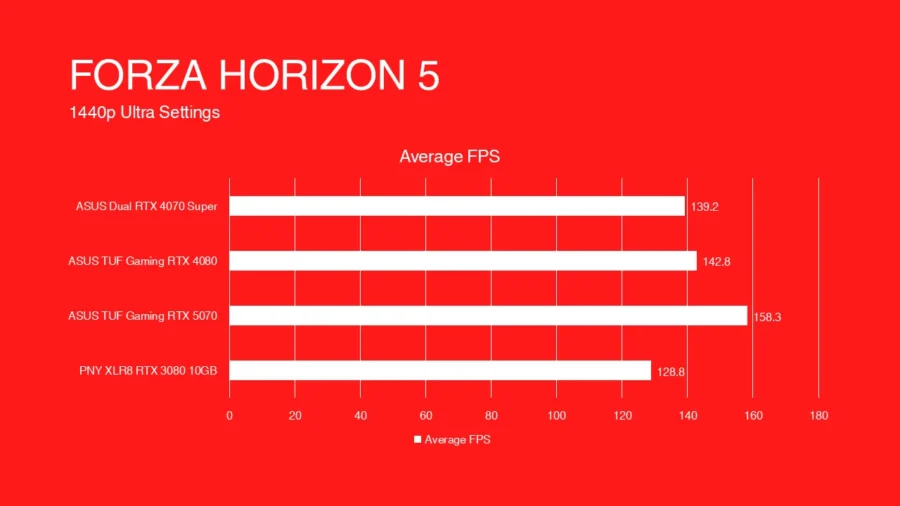
I threw in the RTX 4080 though it was tested on an older build of the game which wasn’t fully optimized then.
Tom Clancy’s The Division 2
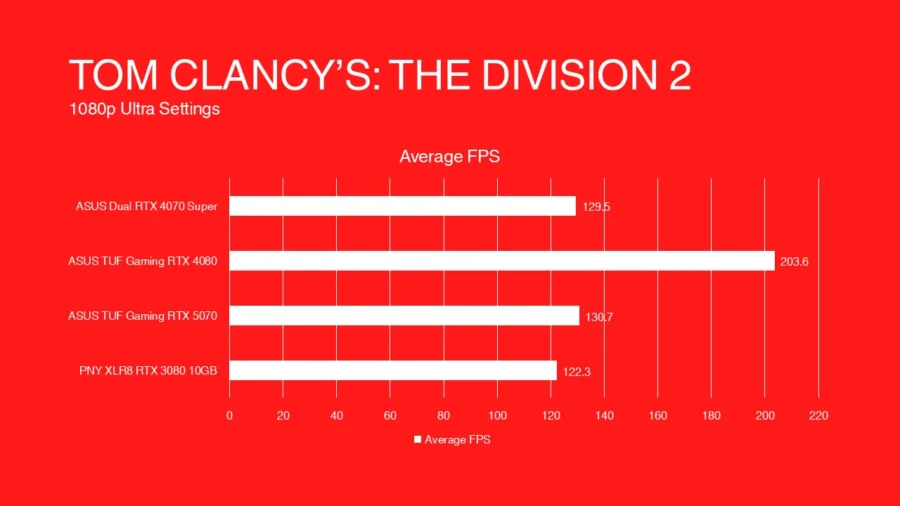
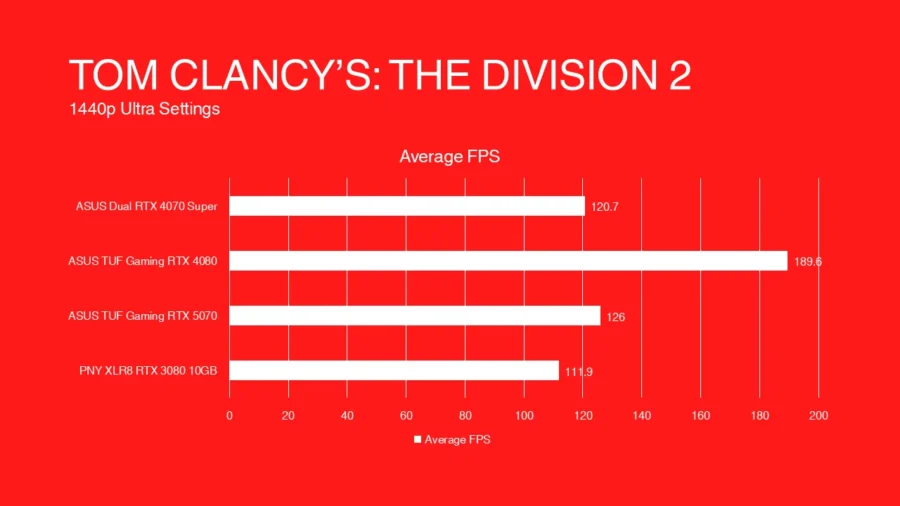
Tom Clancy’s The Division 2’s Snowdrop game engine is still giving GPUs a good workout for a long time and testing the RTX 5070’s graphics prowess. Average FPS on the RTX 5070 hits around 126FPS+, a slight climb up from the RTX 4070 Super at 120FPS and a slight jump from the 111FPS. Since I have an RTX 3060, I’ve included in the benchmark for it, averaging at 52FPS at 1440p resolution, making a big leap by having 2.1x better with the RTX 5070. As for the RTX 4080, it blew everything, using its raw power, which still holds really well after almost three years.
Multi-Frame Generation Testing with Cyberpunk 2077
As Cyberpunk 2077 is the only game I currently test (I have other games that were purchased/redeemed recently) that have had the chance to get other GPUs tested (RTX 4070 Super and RTX 5070), it shows it favors the newer GPU. On CPU bottlenecking problem is somehow addressed as using MFG lowered the CPU load to <50%, letting games running MFG use >90% of the GPU’s load. Also, RTX 40 series having introduced frame gen only with 2x scale will mean that the FPS boost would not be as much as the RTX 50 series’ 4x scale.
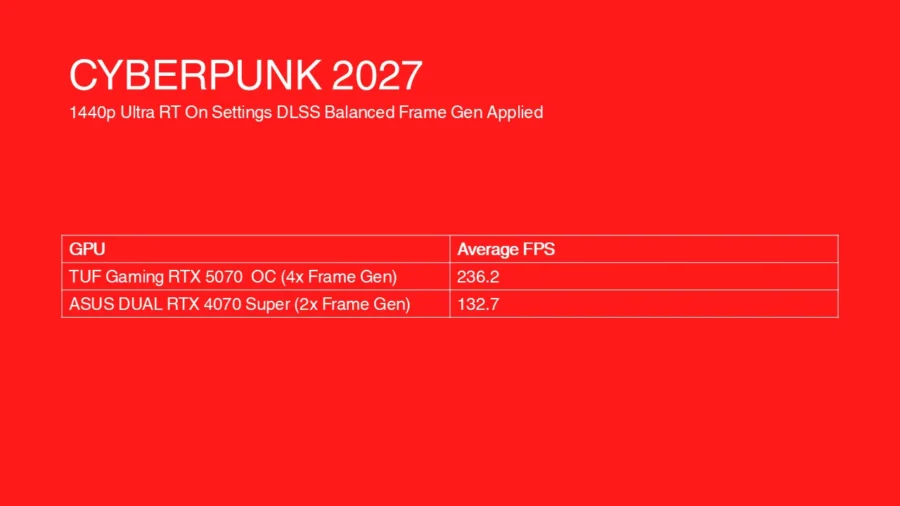
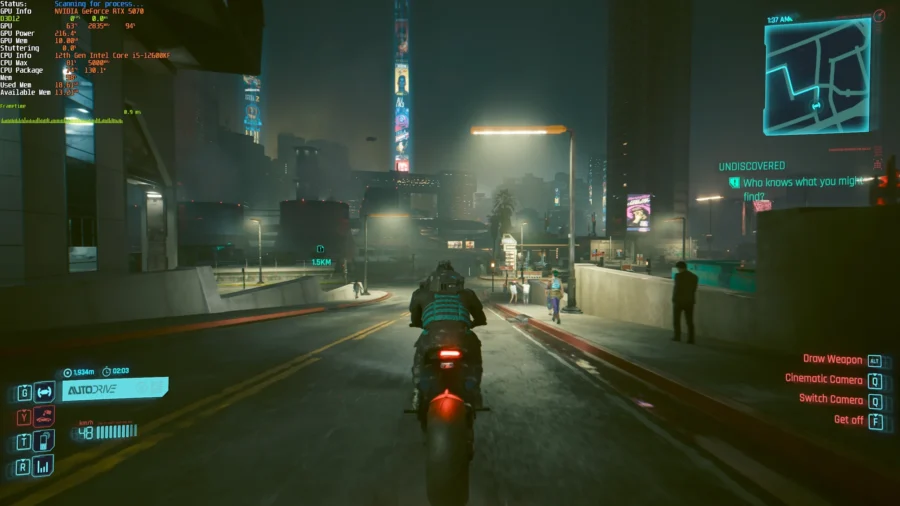
Playing with Multi-frame generation (MFG) on Cyberpunk (4x mode) automatically turns on NVIDIA Reflex for us, which fixes the control lag issue, and it does knock down the additional few frames I’ve gained. Other observations made were distant objects having rendered as low detail (which is a given on multi-frame gen focusing on the immediate area of the player), or certain background pieces like road signs or posts/small objects that are closer to V, which may be some of the persisting problem with frame generation.

With NVIDIA Reflex turned on, controls feel more responsive, V moves to the direction I want to. BUT on some precise tasks, I found it tricky to time long range shots like throwing knife or sniping to hit at more distant enemy (around 20m) as even if I lead my shots it still manages to miss or even if the target is standing still or doing small movement, which isn’t an issue if MFG is turned off..
Temperature and Power
Power efficiency is a carryover from the RTX 40 Series. Comparing it to the ASUS DUAL RTX 4070 Super I reviewed previously; there’s just a slight uptick in idle 4W(RTX 4070 Super) vs 7W(RTX 5070) and full use 250W(RTX 4070 Super) vs 285W(RTX 5070). Now, comparing it to the PNY XLR8 GeForce RTX 3080 10GB LHR GPU, it’s night and day as the idle is equivalent to around 40W and 100% usage hits at around 385W (sometimes even 400W before). Here are results from using both GPUs using 3DMark Time Spy 12.
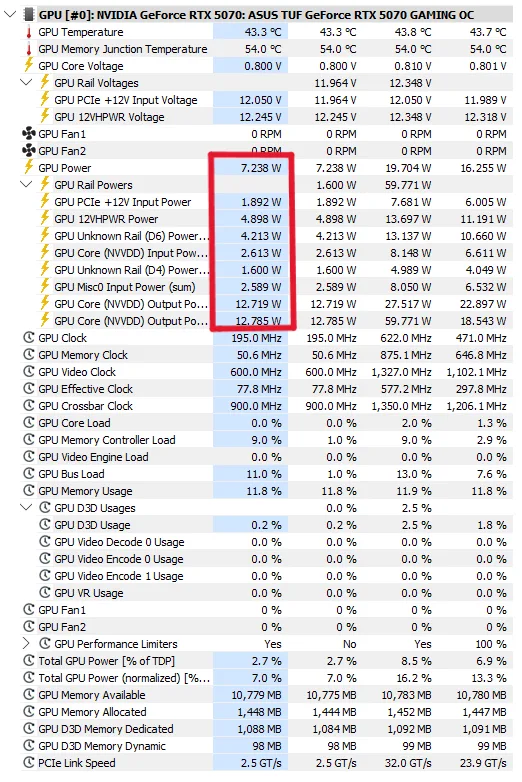
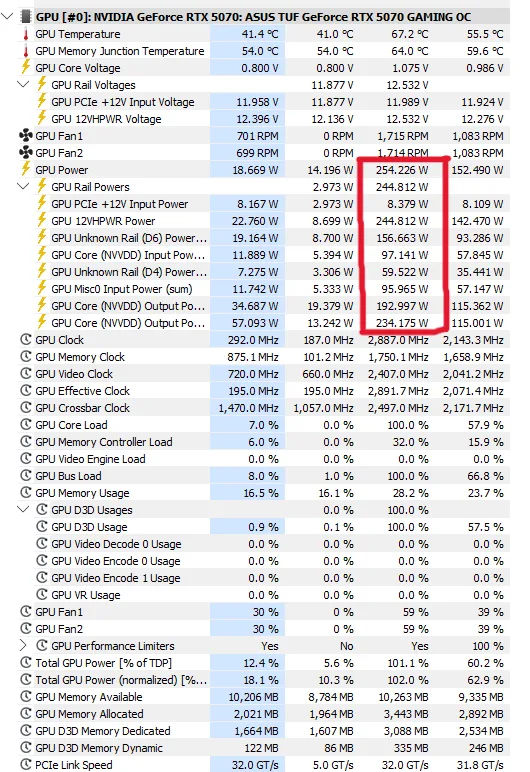
Given the TUF Gaming Graphics card design is engineered to have a hefty weight and size amongst its rivals in comparison. The cooling capability of the GPU is top notch, with a chip design at 4nm and having an almost 3-slot thickness and lengthy aluminum fin stack, it manages to run cool at 40-42degrees on idle, even lower than what the reported idle temperature of the CPU the test machine is using cooled with a DeepCool Assassin IV cooler (with ASUS ROG AI Overclocking turned on.
Summary and Verdict
The ASUS TUF Gaming RTX 5070 is a generational upgrade, having an over-the-top cooling performance, and power to performance to users. As a midrange competitor to the previous RTX 4070 series (including 4070 Super) it justly edges over it by a few frames, based on gaming tests at 1440p resolution. While it does support multi-frame gen technology, this feature is rather used mostly for showcasing tech. While there is NVIDIA Reflex, not all games support it along with Frame Gen so it’s not a best bet to run Frame Gen all the time, especially with esports titles that require fine player input.
I’ve tried running games at 4k resolution and happy to say that the RTX 5070 is able to handle it much better than the RTX 3080, having better frame rates than before. Previously the RTX 3080 was able to run games at 4k but just around the area of 40-50fps with reduced texture quality due to the 10GB video RAM size being a handicap. 12GB may be small but it does get the job done at least.
A big factor to move away from the RTX 30 Series, especially RTX 3080 is how power was managed. The RTX 3080 as shown in the power test uses a lot of power when running games. That power use affects both electricity bills and thermal output. By using more power, the GPU runs hotter, and gets my room hotter, leading to using more power in cooling both PC and room. This adds to the power being consumed by the GPU itself.
Price contention, it’s expensive for its class. The TUF Gaming RTX 5070 currently (August 2025) is now priced at around Php 52,000 or down to Php 51,000 a large decrease from that of around Php 60,000 when I bought it last May (and Php 69000 on 12 months installment). Looking at historical data queried around the internet on how much the TUF Gaming 4070 Super came out last year: it’s priced around Php50,000 then and around Php 43,000 now. It’s on par with its previous generation SRP from ASUS.
In the end, I like the GPU, it’s a worthy upgrade for my old RTX 3080 with the future savings it brings on power and improved features like multi frame generation and AI development. For a consumer looking to upgrade might avoid this if you’re coming from the previous RTX 40 Super series generation, given how small the improvement is. RTX 40 non-Super and RTX 30 series, you may have to think deep if the upgrade is really warranted. But if you’re coming from the older RTX 20 series and have missed/skipped out on the RTX 40 series (which have their stocks starting to going out) have the RTX 50 series as an option in general.