
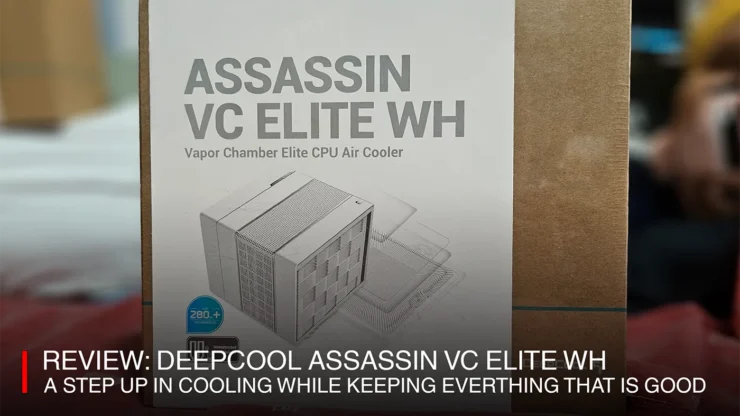
The new DeepCool Assassin IV VC Elite WH does better than the now old DeepCool Assassin IV CPU Cooler. Launched in May of this year, the DeepCool Assassin IV VC WH is a change in the inner design of the company’s flagship air cooler. While retaining a visual similarity to the original Assassin IV WH, the incorporation of a vapor chamber for its CPU block adds some more cooling potential.
In this review, I’ll go over the major change (the vapor chamber) and how it improved upon the original Assassin IV model.
Table of Contents
Assassin VC Elite WH Package
The DeepCool Assassin VC Elite WH Package consists of the same items as the original except for a couple of changed parts and one new accessory.
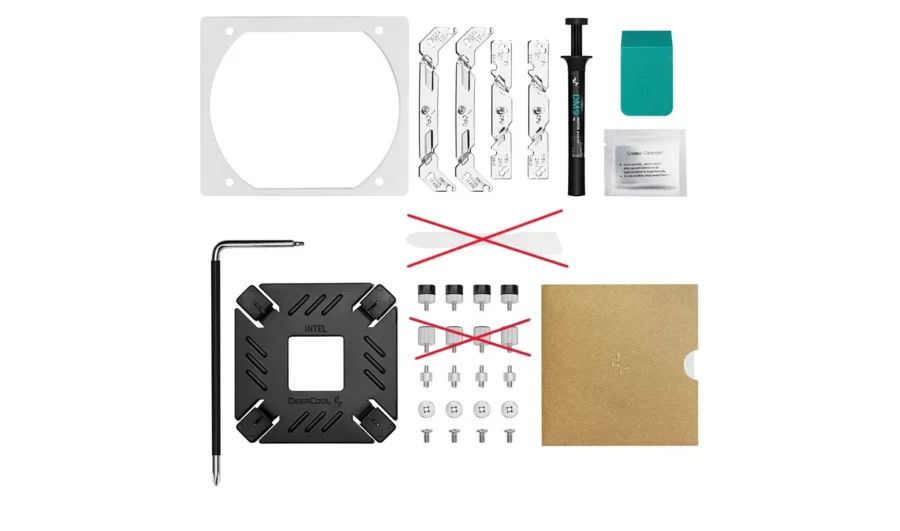
Beefier back mounting plate (for Intel), but some mounting accessories were changed
The back motherboard mounting plate was changed. The original Assassin IV motherboard plate featured an X shape with a short adjustable screw shaft for different CPU models under the modern Intel lineup. This screw shaft is short in length, therefore an adapter (a mix of female screw hole and male screw head with no bushing) screws in (This is for the modern Intel Mount, AMD uses a different adapter which has the bushing) prior to connecting the mounting bracket. The mounting brackets come in two sizes, a pair of long brackets for Intel and a shorter one for AMD. Also, all of these parts come in painted black.


The new Assassin VC Elite WH has a beefier square plate. The screw shafts for the mounting plate are longer, yet still adjustable. Instead of using an adapter, it uses a plastic/rubber spacer/bushing to provide space between the bracket and the motherboard. It can be tricky to install this if you don’t put a double-sided adhesive on the rear mounting plate (or someone to hold the mounting plate from behind the motherboard) as the plate would drop as the spacer has no way to grip threads. More on how to work around this at the installation experience section.
The mounting brackets for the Assassin VC Elite is the same size from the old model. While the mounting plate is painted black, the brackets and mounting plate nuts are nickel plated.
Thermal Paste, Spreader and Remover
The original Assassin IV package included a 1.5g thermal paste, roughly good for 2-3 times of maintenance, and the new model still has it. I’ll be honest as I have not used this on my old Assassin IV as I’m more relaxed using Arctic’s MX series. They also come with thermal grease remover paste, but again, I just use alcohol and a cotton pad to wipe off thermal paste on the CPU. However, their thermal paste spreaders were updated.
The original came with a basic spatula (which can be found on other high end thermal paste packages like my Arctic MX), however, the VC Elite comes with an eraser like grease spreader. I’d actually keep that pristine as a keepsake, though I originally thought it was an eraser for removing blemishes on the white cooler. But if you do not have thermal paste and spreader, better use them, also the size of the included spreader is wide enough to easily spread.
Long hex and screwdriver included, like Ikea
The most important tool in the cooler’s package would be the hex and screwdriver. Because of the Assassin IV’s enclosed double tower design, it’s a challenge for builders to suddenly find themselves lacking a long screwdriver. DeepCool includes that in the set to ensure completion of installation, aside from having a tube of thermal paste instead of pre-pasting the cooler. It gives some DIY Ikea vibes to it.
Assassin VC Elite WH Installation Experience
Installation of the Assassin VC Elite WH is the same with the original. We must first install the back plate (for Intel this is required, but for AMD we use the included plate of the AMD based motherboard). Add the spacer pieces (for Intel) on the mounting plate studs, while for AMD we screw in the adapters. AMD’s installation for its mounting plate’s easy right? Intel has a challenge for the new mounting accessories.
In this setup, I’m going the upgrade route, meaning, I’m not removing the motherboard. The desktop case is a DeepCool CH560 Digital, which has a big rear cutout for its motherboard tray.
Step One: Connecting the Backplate (Lucky for you AMD users)
Now the problem for Intel installation is that it no longer uses a similar adapter setup as AMD’s but with a spacer. Now the best workaround for this is to use a double-sided tape to avoid the back plate from falling. On my old Assassin IV, I used a short piece of industrial strength to stick the backplate. It does its job really well, really well that it took some time for me to remove the original backplate and replace with the new plate for the VC Elite.
Now, if you don’t want to run into this situation, an alternate way of installing is to screw in the retaining nuts to the backplate’s threads with the spacers installed. This prevents the backplate from falling.
Step Two: Adding the brackets

We then cut to installing the brackets. Intel and AMD have different bracket sizes. The longer brackets for Intel and the shorter ones are for AMD. The brackets are stamped with the CPU brand along with an arrow as to where the bracket should face (towards the CPU). On the Intel installation, I would then remove one set of the nuts and install the bracket, then secure them with the nuts, that way the backplate wouldn’t fall off the back of the motherboard.
Step Three: Plugging in before attaching the Cooler
Now comes the first of the challenges. installing the unit. The Assassin IV is simply a gigantic cooler, and with that is the complexity of getting the cooling fans’ wiring to the CPU_FAN motherboard connector. Now if you’re working on a motherboard such as the ASUS ROG Z790-A Strix (or any STRIX variant of the Z790 line I believe), the CPU_FAN connector is tucked in just behind the top-most VRM heatsink, a tight fit, more if you have fans installed on the desktop case’s top section. If there’s enough space on your desktop case, then we can skip this part until later, but if installing on a cramped setup, then read on.

A trick to work on this tight setup is to plug the fans to the connector before securing the Assassin. It’s nice that the fans are daisy chained together, which DeepCool supplied. If attaching a third fan to the front of the cooler, just use another daisy chain cable if the extra fan has to connect. If not, then you can plug the fan to a different fan connector but ensure that we match fan performance with the fans plugged to the CPU_FAN connector.
Given that there’s some space in the case we can rest the cooler with the fans plugged in before we apply thermal paste. Also, we do not need to insert the 140mm middle Cooler fan immediately. the fan’s cable is long enough to let it hang outside the cooler.
Step Four: Apply Thermal Paste
DeepCool includes a tube of their proprietary thermal paste with the Assassin IV VC Elite WH. It’s the same as the original Assassin, but for this test, I must use the same thermal paste I used for my old Assassin IV. For tests, I’ve used Arctic MX-4. The last maintenance I had on the PC I liberally placed the remaining paste from the tube. This caused some of the extra paste to spread too much and overflow and spill some more on the CPU socket when I removed the CPU to clean it.
This is where the thermal paste spreader works. We should just put in just a small amount of for the paste to spread. The new Assassin IV VC Elite WH has a different design where DeepCool ‘painted’ the cooler’s cold plate with a Damascus style white and black pattern on the plate, with a small square that is bare finish (and slightly raised). This means the cooler will focus on that particular section. And by spreading the paste using the spreader (or any spatula, like the one included in my MX-4 package) thinly on the CPU it prevents any excess from spilling over. The next step will further explain why it’s better to spread the thermal paste thin.
Step Five: Install and secure the Cooler to the brackets
Once the paste has been applied and spread, the Assassin VC Elite goes on top. We need to line up two captive screws on the cooler’s plate with its equivalent screw holes on the brackets. By having thinned and spread the thermal paste beforehand will aid in avoiding the paste from spreading unequally on the CPU as we may end up wiggling the cooler to shoot the screws on to their holes.
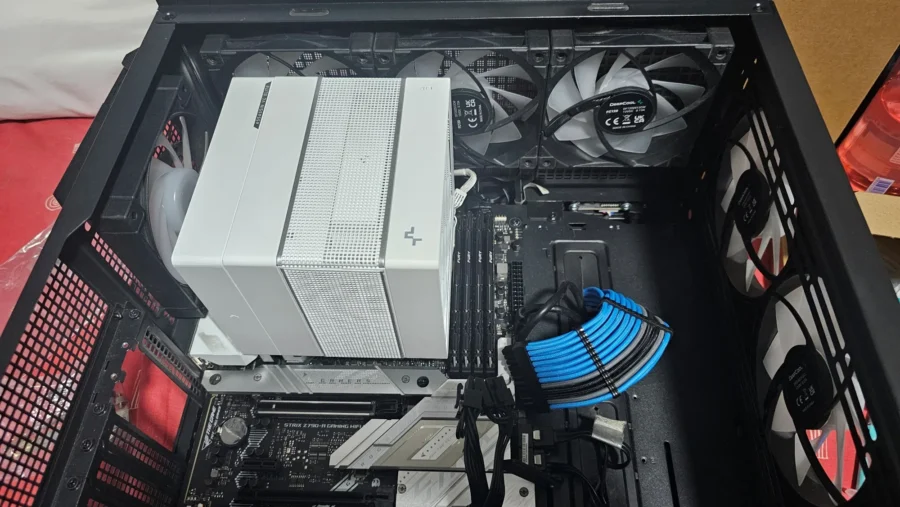
We finally use the long screwdriver that is included with the package to tighten the screws. This is much simpler if we install the cooler on the motherboard. But given the possibility of tight confines of the case the cooler is being installed on, installing the CPU power cables as well as affixing the motherboard to the case’s stand-offs may prove to be a problem.
Optional: Install front 120mm fan with included mounting bracket for the front part of the cooler.
With the Assassin VC Elite WH installed we are now able to perform tests.
Assassin VC Elite WH Test Results
To test the cooler’s performance against its predecessor, I’m using the setup I had from the original Assassin IV consisting of:
- Intel Core i5 12600KF (base speeds and AI Overclock configured)
- ASUS TUF Gaming RTX 5070 12GB OC
- ASUS ROG Z790A STRIX-D4
- Kingston Fury Beast DDR4 3600 (CAS 17) 32GB
- DeepCool CH560 Digital Desktop Case (positive pressure fan configuration)
- Seasonic Prime Gold 850W Modular PSU
This test is not a technical heavy as I do still lack some testing materiel (and data/time) for proper full-on testing. Observations were conducted using HWInfo’s Sensor functionality for CPU and Motherboard, with focus on the overall CPU Package Temperatures. The test environment has an ambient temperature of around 26-27 degrees Celsius with a room air conditioner. This approach is slightly different as the ASUS AI OC measures the cooler’s score based on an initial benchmark run and provides the setting, namely the fine-tuned power configuration for the CPU.
Fan profile is custom configured in ASUS FanXpert 4 for both having the same settings.
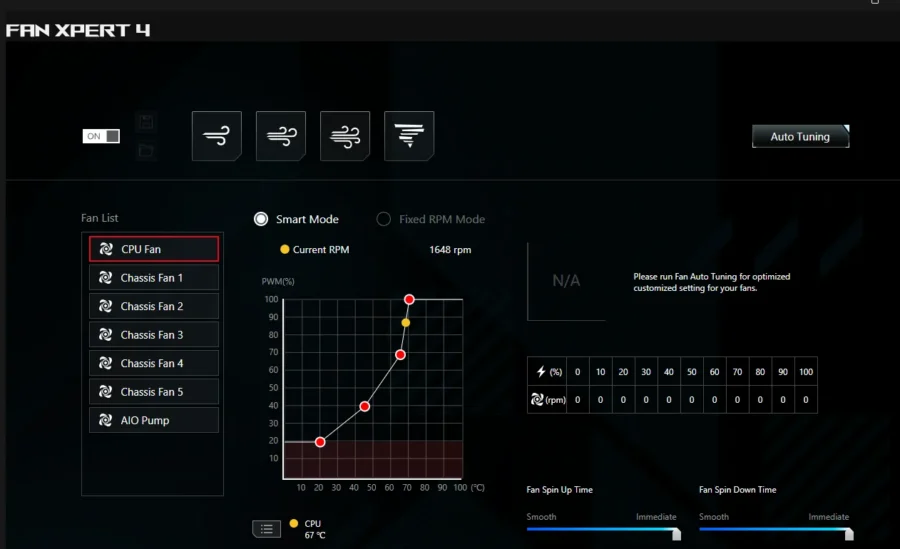
In case heading columns in HWInfo are not seen, they are ordered from left to right as: Current, Minimum, Maximum, Average.
Old Assassin IV run
I’ve run a 30min stability test through Cinebench 23 on a 5.3GHz speed through its idle (just before starting the Cinebench 23 run) and during benchmark. For the original Assassin IV model, while it is using a 5.3GHz overclock, the AI Overclock built in by ASUS tempered the configuration of the OC by limiting the power being given to the CPU, leading to low duration of maximum CPU speed for both P-Core and E-Cores.
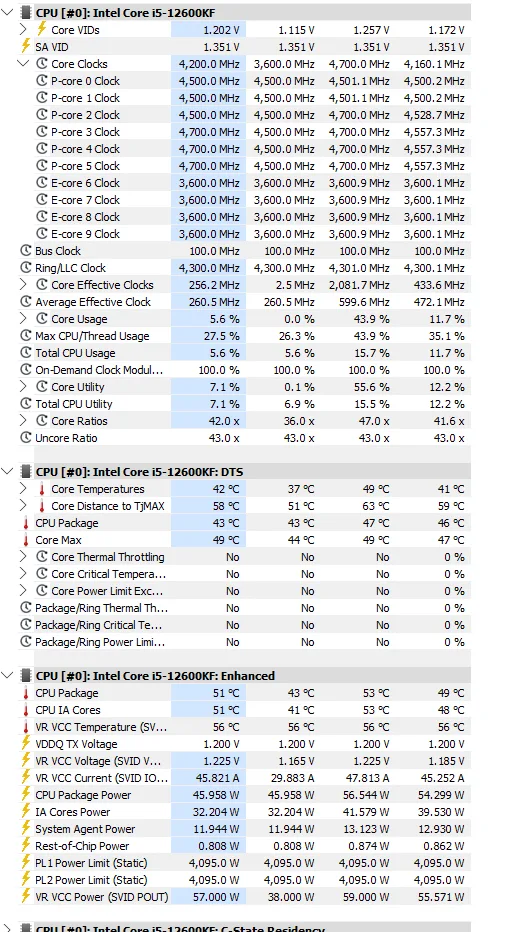
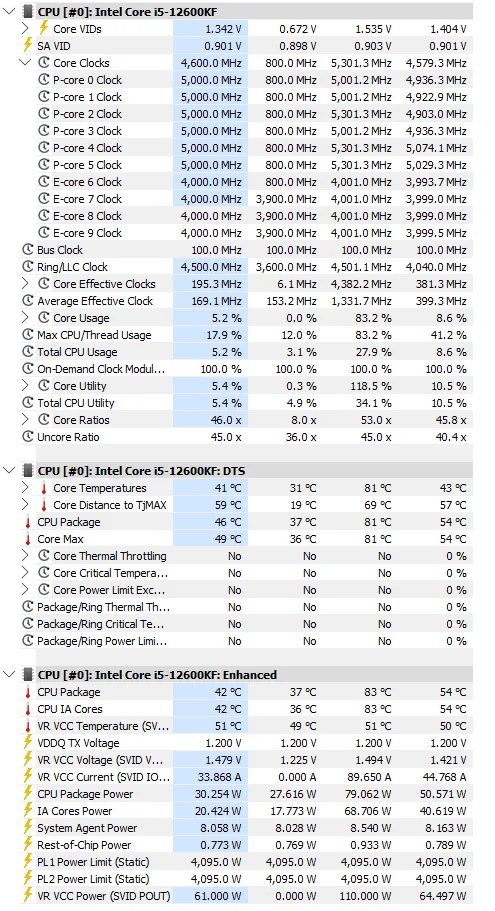
A noticeable observation I found with the original is the high minimum temps I got while using the overclocked mode. It only started going down a few minutes after starting windows and just before starting Cinebench r23. While running Cinebench r23, the maximum temperature only hits up to 83 degrees, not critically hot, but duration for running the CPU cores at 5.3GHz is very, very brief (nigh difficult to capture a screenshot of), with most of the time spent at 5.0GHz on P-Cores. E-Cores runs comfortably at 4.0GHz. Power settings on the CPU provided by AI Overclock only went as high as 79W maximum, which may not be completely right as I’ve just started the benchmark run for it.
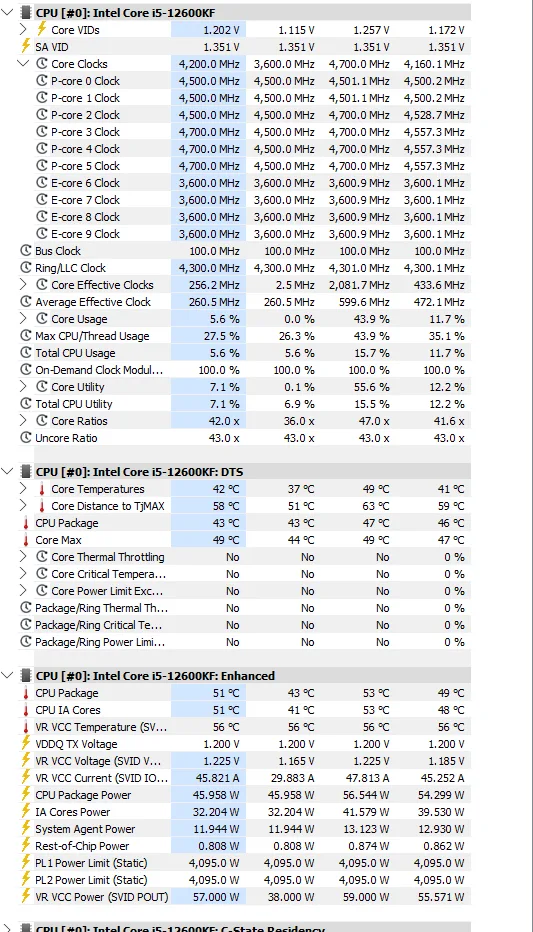
When trying to get the lowest temperature I can, I used a basic stable overclock I have then was at 4.7GHz on P-Core and 3.6GHz on E-Core. The best I can get was 37 degrees Celsius only.
New Assassin IV VC Elite WH Run
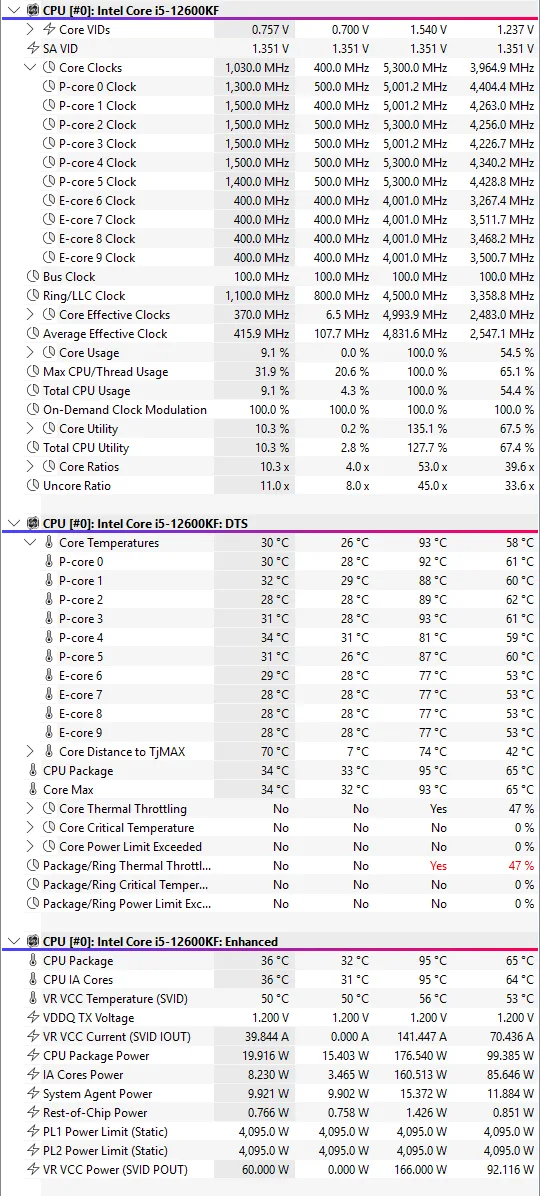
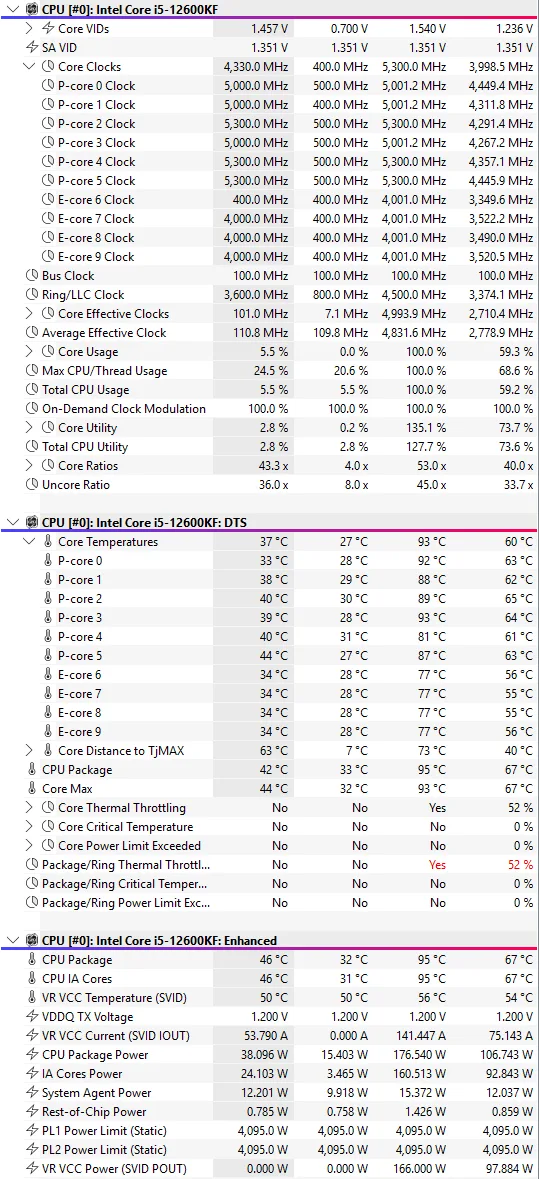
In this test, the idle temps were taken a few minutes after the benchmark run. The lowest temperature registered at 32 degrees Celsius, around 5 degrees lower than what the original Assassin IV model was able to put out. But it also flipped the table with the maximum temps, as the maximum temp hit 95 degrees Celsius. This is due to the way AI Overclock operates by rating cooling capacity through training. As I have trained the system for the new cooler (after resetting old training data) it deemed the Assassin VC Elite as a high-capacity cooler, hence it went full on increasing CPU package power to 176Watts.
I would think that the AI Overclock did leave some safety measures on to prevent the CPU from cooking, hence exhibiting a behavior or thermal throttling on a combination of cutting power quickly when it reaches a certain wattage and temperature. And the Assassin VC Elite able to disperse heat quickly.
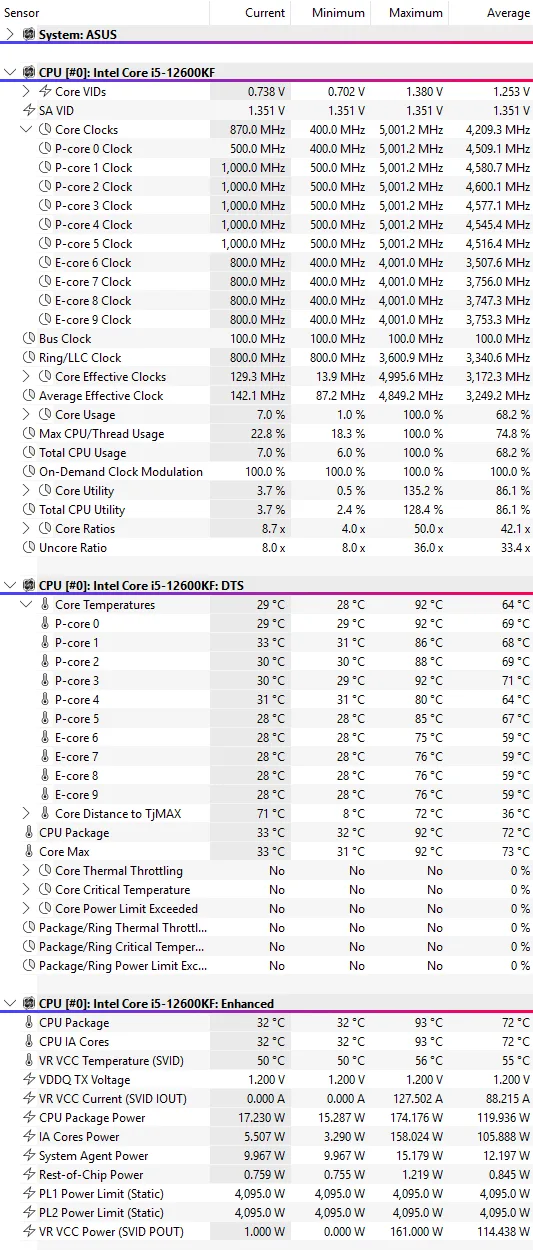
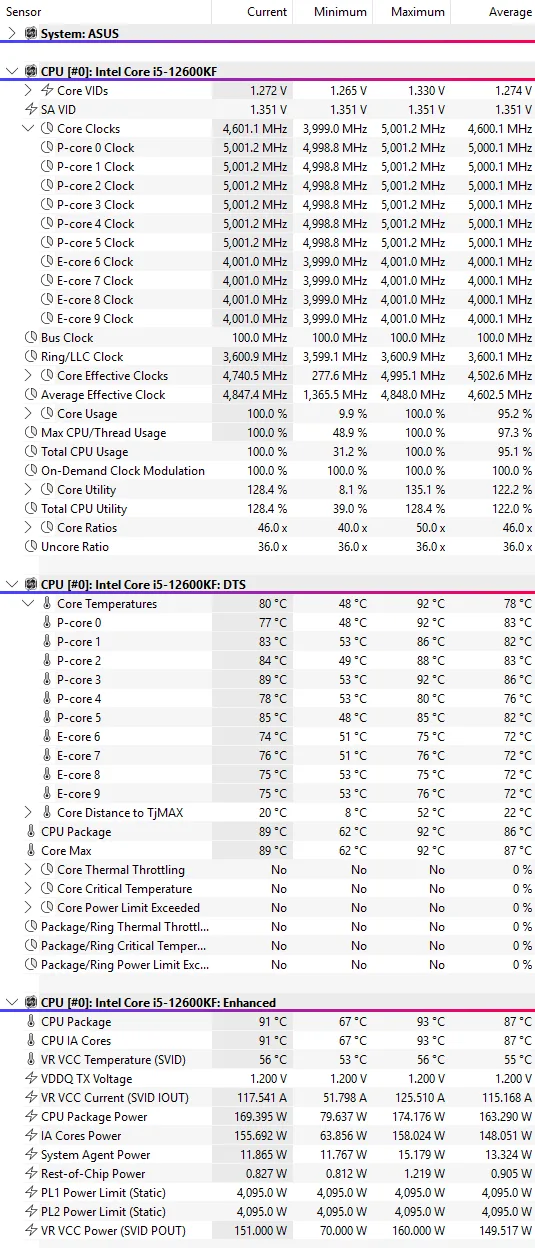
While 5.3GHz is the theoretical maximum speed my ASUS motherboard’s AI Overclock is able to pull; the safest speed (and most efficient power wise) I would operate is at the 4.8-5.0GHz range. On the DeepCool Assassin VC Elite, it is able to exhibit a very stable, yet fast overclocked speed. It keeps a very controlled 87 degrees Celsius +/- average temperature while running a benchmark test with a maximum spike of 93 degrees as reported by HWInfo. Power utilized is kept to a maximum of 174Watts which prevents the CPU from throttling down. The lowest temperature is still at 32 degrees Celsius, very cool.
Conclusion
The DeepCool Assassin line is the company’s air cooler flagship model. The original Assassin IV released in 2023 was nice and capable, but to further improve on the product, the introduction of a Vapor Chamber is a step in the right direction (or progression).
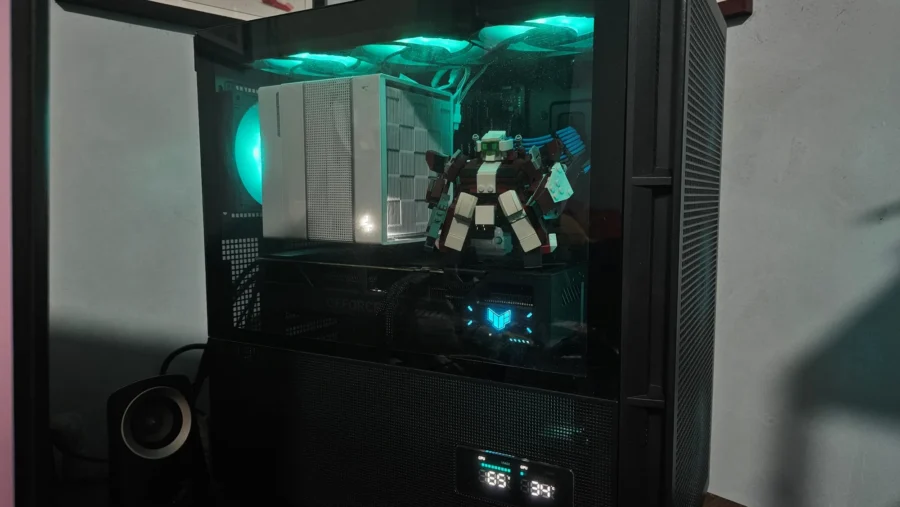
It does not fix what is not broken with the overall design, keeping the same fin stack design, with the overall change happening on CPU block. It still comes with black and white models as well. A nice touch is the Damascus style pattern on the bottom of the cooler, only exposing the nickel finish as the part that actually has to make contact on the CPU.
For installation, AMD users don’t have anything else to find an issue with the mounting accessories, but for Intel users, they did however update the rear mounting plate to be bigger. But it has a tradeoff of trying to cheap out by using rubber spacers for the top side to connect with the brackets which can make installation a of a challenge especially when upgrading coolers.
But if you are upgrading from the original, I guess you can still use the same mounting plate and bracket setup from the old model. I still do find it tricky to mount the cooler on the CPU itself, as there is a tendency for the cooler to slide off the CPU if it doesn’t find either to the screw holes.
The inclusion of tools and thermal paste that can be used by up to 2x is a good value. Especially with their long screwdriver with hex and Philips heads. The new thermal paste spreader is neat, though it does look like an eraser on first glance. It is wide to evenly spread out the paste quickly.
The cooling aspect, does it really well, to the point that it was able to put the AI Overclock system to its paces in training the CPU in overclocking the Core i5 to a very high-power setting on an air cooler, though it did snag some throttling issues, due to the nature of the overclock system of training itself. A manual overclock will probably solve this, but that will be for a different time. While the CPU runs hot quickly with the aggressive overclocking by the motherboard, the Assassin VC Elite is able to quickly dissipate the 95-degree Celsius recorded heat down to around 85,86, or 87 degrees Celsius.
Price wise, the DeepCool Assassin VC Elite has a price around Php 7,920 and currently on discount at Php 7,450 at Pinkle Hub’s Lazada/Shopee page. The original Assassin IV model in black for comparison was priced at Php 6000, also at Pinkle Hub (but Lazada store) back in 2023. Right now, it is priced at Php 7,488 at the store but with the ongoing 10/10 sale it is at Php 6,826 after vouchers. The Assassin IV vs Assassin VC Elite price difference is quite small at around < Php 500. It’s a definite no brainer to get the VC Elite given how well it can cool CPUs.