
I received an AMD Radeon AI PRO R9700 Graphics Card around last week from our friends at AMD Philippines to tinker around within a week on various AI work, creative AI and even some gaming. AI is very much a major aspect in doing tech these days. Now to frame this review, let’s put into perspective of breaking away from the use of subscription-based AI services to a local one. And how can a GPU like the Radeon AI PRO R9700 fit this.
Table of Contents
The Case of Running Localized AI Machines
From working with Chat Agents for use in getting quick information from in and around corporate sites and the web, to developing web applications to generating 2D/3D images all with the use of a little creativity, imagination, and the right words to create something from scratch. Most of the tools for generating content, research and code are available online, and they cost a pretty penny especially if AI tools are used daily. Monthly costs can run up quickly, especially if getting plans with higher token caps or paying for excess token use can really hurt your, or a small company’s budget.
Now to offset the costing of letting companies sell subscription to access their AI, an alternative is to bring the AI to your PC to a local level. There are AI Models out there that are publicly available for us to download and load on to a server like Ollama (more on this later) to run the model as an agent or act as the medium for other AI tools to work. As we know, Graphics Cards play a major role in the AI model’s processing, The run of the mill graphics card can actually do AI work, especially models that came out in the early 2020s (that are reasonably powerful enough).
But consumer grade graphics card will have some pitfalls, primary of which is the VRAM size. There are of course standalone machines now available that are built for local AI Agents but are constrained to only a single or a few users and are essentially an entirely new machine to add. But what if you already have an existing PC that only needs the necessary boost coming from a graphics card?
Most modern mainstream GPUs have 8GB VRAM available. A handful of them have 12GB and 16GB (which are mostly NVIDIA RTX 5060Ti, RTX 5070Ti and AMD Radeon RX 9060XT and RX 9070XT). The biggest has 32GB (NVIDIA RTX 5090), which is priced absurdly high (and still getting more expensive). While you can run any AI model with 8GB of VRAM, the context of the AI model to essentially figure out your needs will be constrained and will definitely get from your main system’s RAM. It will bottleneck the process leading to a slower output.
If this is a personal project that time is not a factor, then it would be fine. But if you are serious in making some income out of this endeavor, then this is where the AMD Radeon AI PRO 9700 comes in for the clutch.
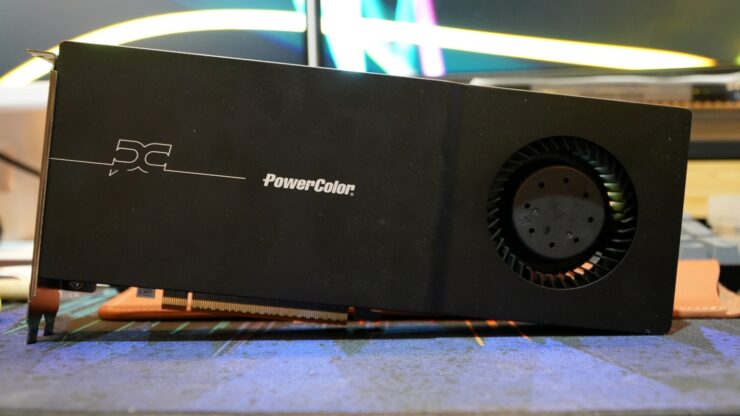
The PowerColor AMD Radeon AI PRO R9700
Made primarily for workstation and servers, the AMD Radeon AI Pro 9700 is AMD’s solution for running local AI Models. The overall design of the Radeon AI PRO R9700 calls for a compact size that can fit both desktop and rack mount cases and for effective cooling, a blower style cooler. It is made to scale up from a SFF dedicated AI PC, which is limited by power (but having a large, shared memory size), to be useable on a standard desktop with support for one or more graphics cards for multiple supported AI workloads.
While there’s no specific AMD Reference Card, the unit I’ve used for this review is the PowerColor AMD Radeon AI PRO R9700. All partner versions of AMD Radeon AI PRO R9700 come with the same 2-slot high design, 266.7*111.2*40mm board dimension, a minimum power requirement of 750W and uses the 12VHPWR connector found on the end part of the GPU to facilitate server rack plugging. Cooler design uses a big vapor chamber with dense aluminum heat fins and cooled with a massive blower. Interface, it comes with four DisplayPort 2.1a.
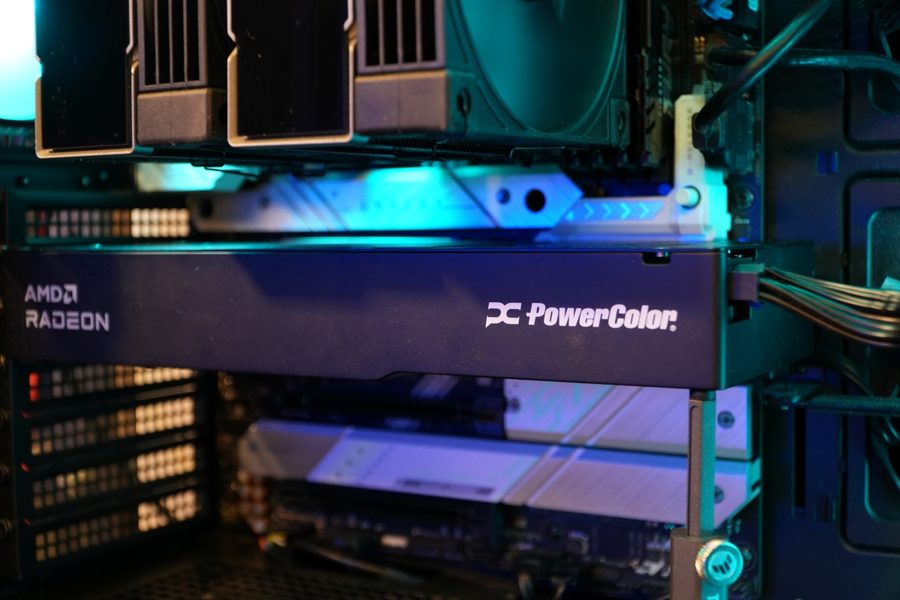
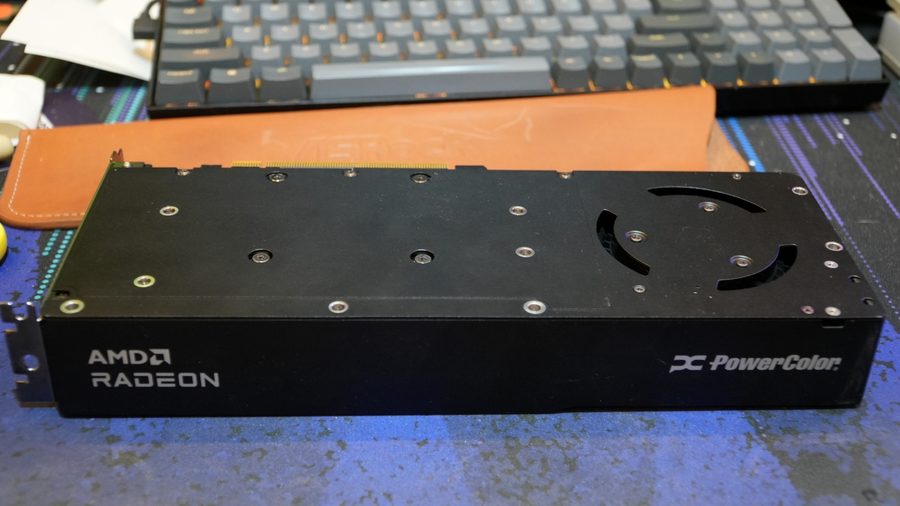
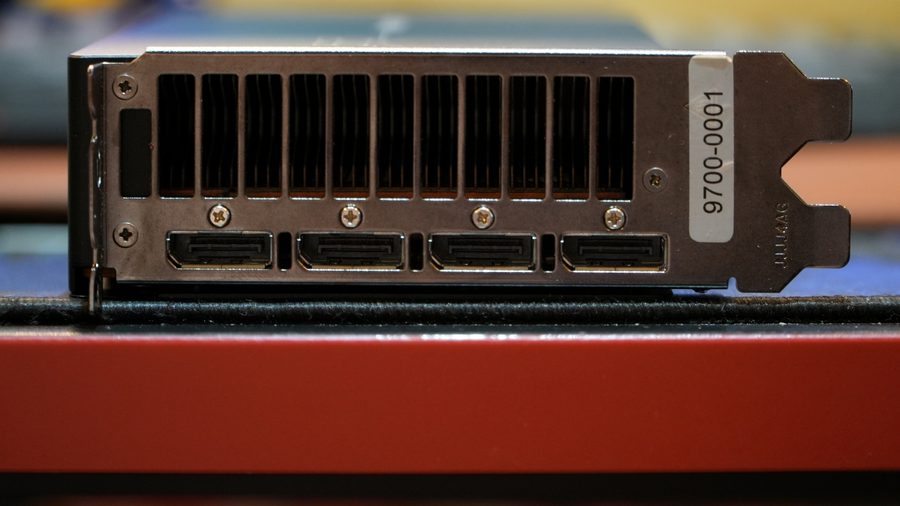
The core itself uses AMD’s RDNA 4 architecture, which is similar to the AMD Radeon RX9070 a popular model known for its budget friendly price, but having half the available VRAM as the AI PRO R9700’s. The AI PRO R9700’s GPU has more Compute Units, Ray Accelerators and AI Accelerators, but running slightly slower than the RX9070. In a way, the Radeon AI PRO R9700 is an upper spec GPU, akin to an NVIDIA RTX 5080, which is the RTX 5070/5070Ti to the RX9070 if one does set a model comparison to the competition.
The 2-slot design owes to the flexibility to allow multiple Radeon AI PRO R9700s to be installed on workstation setups like that of AMD Threadripper HEDT PCs. The design doesn’t scream “notice me” like that of consumer grade GPUs nor has the bigger fin stack and quieter cooling fans.
| SPECIFICATION | |
| Graphics Engine | Radeon™ AI PRO R9700 |
| Model Name | AI PRO R9700 32G-B |
| Series | PowerColor |
| Stream Processor | 4096 Units |
| Video Memory | 32GB GDDR6 |
| Memory Speed | 20.0 Gbps |
| Memory Interface | 256-bit |
| Engine Clock(STD/Silent | up to 2350MHz(Game)¹ up to 2920MHz(Boost)² |
| Bus Standard | PCIE 5.0 x16 |
| Standard Display Connectors | 4 x DisplayPort 2.1a |
| Feature Support | |
| DirectX® Support | 12 |
| OpenGL | 4.6 |
| AMD Eyefinity Technology | Support |
| AMD Stream Technology | Support |
| AMD Smart Access Memory | Support |
| Maximum Resolution | |
| DisplayPort | 7680×4320 |
| Power Specs + Board Dimensions | |
| Board Dimensions | 266.7*111.2*40mm |
| Slot | 2 |
| Minimum System Power requirement (W) | 750W |
| Extension Power Connector | 12V-2×6 (16 Pin) |
| Remark | ¹Game Clock is the expected GPU clock when running typical gaming applications, set to typical TGP (Total Graphics Power). Actual individual game clock results may vary. ²Boost Clock is the maximum frequency achievable on the GPU running a burstyworkload. Boost clock achievability, frequency, and sustainability will vary based on several factors, including but not limited to:thermal conditions and variation in applications and workloads. |
Running AI Workloads on the Radeon AI PRO R9700
Now the methodology for testing out the Radeon AI PRO R9700 came about when a demo machine was setup by ASUS and AMD during the UX+AI conference a few weeks back. It was an AMD Threadripper system with the R9700 running a version of ComfyUI that created an app.
Now, as someone who creates, and maintains software in multiple programming languages, I have leveraged the use of GitHub Copilot on Visual Studio Code at work to help in programming at a faster rate as I am the sole developer in my team, thus freeing up time for other tasks. I’ll add the use of a vibe-coding agent as part of the test, an alternative to the use GitHub Copilot for weekend projects, as to avoid paying a premium on GitHub Copilot subscription.
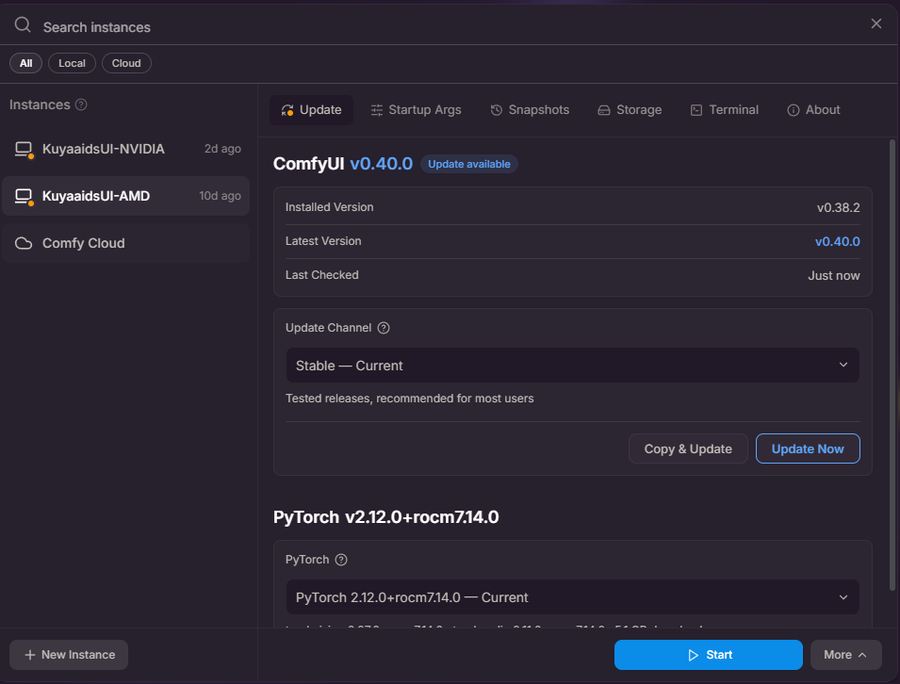
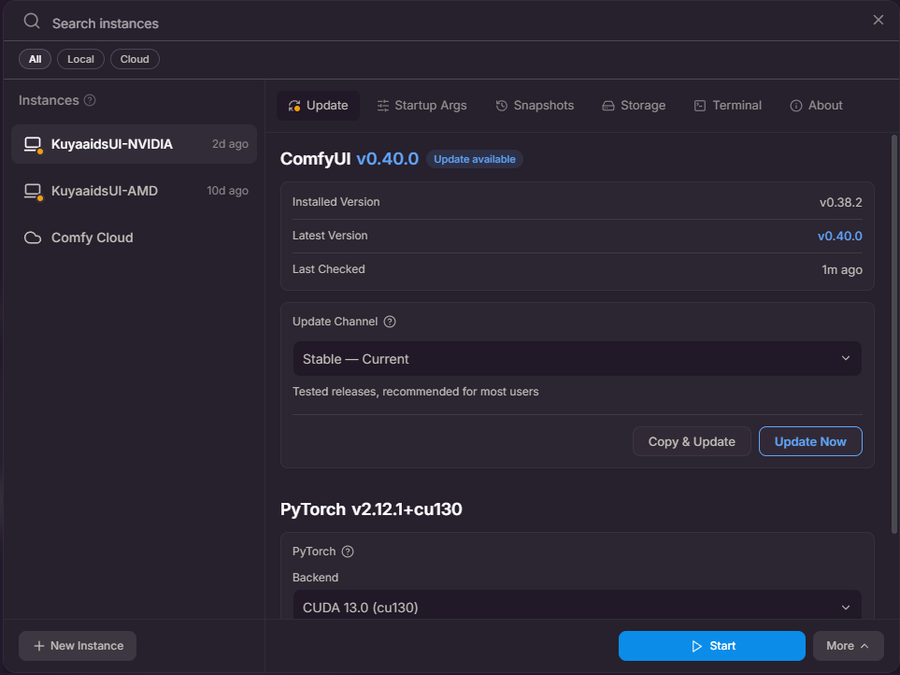
Going back, the use of ComfyUI, will be for testing how other tasks perform, like in 2D/3D image generation, and video. I’ve picked templates with AI Models that utilize both brands of GPUs that do not have heavy biases on either.
Since I do benchmark games on graphics cards, and the Radeon AI PRO R9700 is a graphics card, I’ll include just a short list of games to check out how the GPU performs for gaming. I’m not running any synthetic tests on it, as most of the focus will be on the AI Workload aspect as it is primarily built for.
To execute these tests, I don’t have a a Threadripper with me and to isolate the use of any NPUs that I have (on my new system); hence, I’ll be using my Core i5 12600KF system with its 32GB of DDR4 3600 RAM. And for storage, given how big the AI Models are, I’ll be loading these onto my 2TB ADATA Legend 860 Lite main OS drive.
ComfyUI: 2D Render Test

For the 2D image creation/render/generation test, I’m using ComfyUI Desktop and the template Flux.2 [Klein] 4B: Text to Image. I’ve created my own prompt for this test. I ran the test for both the R9700 and for comparison / control test, my personal RTX 5070.
Comparing the output from the control and our R9700, there’s just a small variation with how the generated subject from both GPUs but kept the overall instructions fed by the prompt. We can measure how well the GPUs performed by the prompt execution time and iterations per second made by them. Rule of thumb for iterations per second is, if there are more iterations, then execution duration should be shorter.
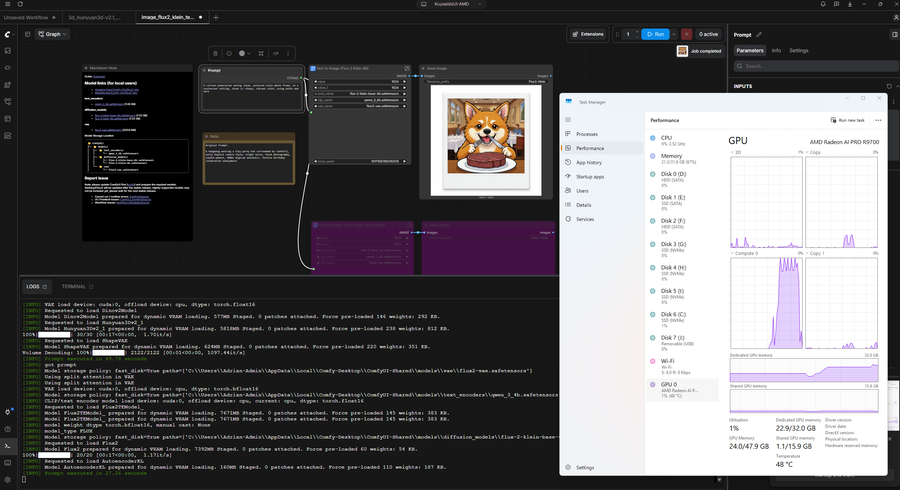
The R9700 performed the image generation run for the first run correct (matching all the details of the prompt) with a duration of 27.26 seconds, and the text to image node ran for 17 seconds at a rate of 1.17it/s. The use of VRAM was loose at 22.9GB and used what amounted to roughly 72% of the entire 32GB.
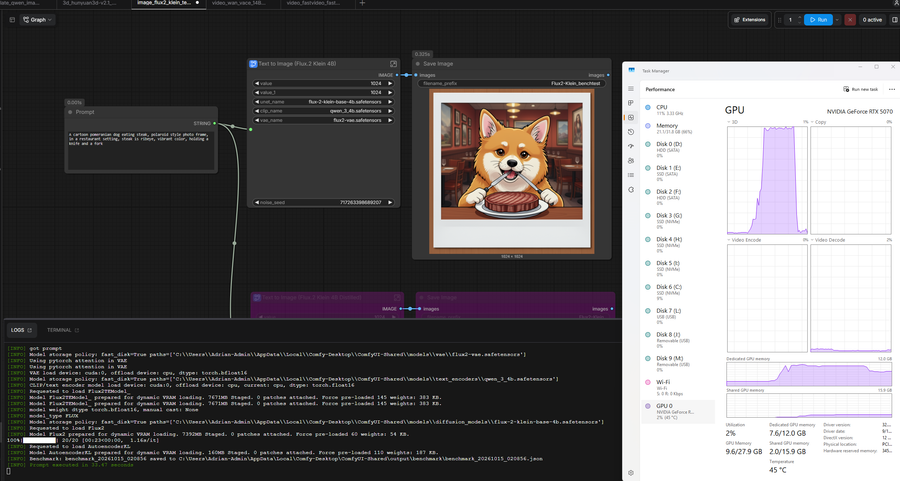
Meanwhile, the control GPU RTX 5070 executed the prompt in 33.47 seconds with the text to image node lasting for 23 seconds at a rate of 1.16it/s. The used VRAM hit at 7.6GB, 63% of the 12GB maximum VRAM. And the dog was holding two knives, not a pair of knife and fork.
ComfyUI: 3D Render Test
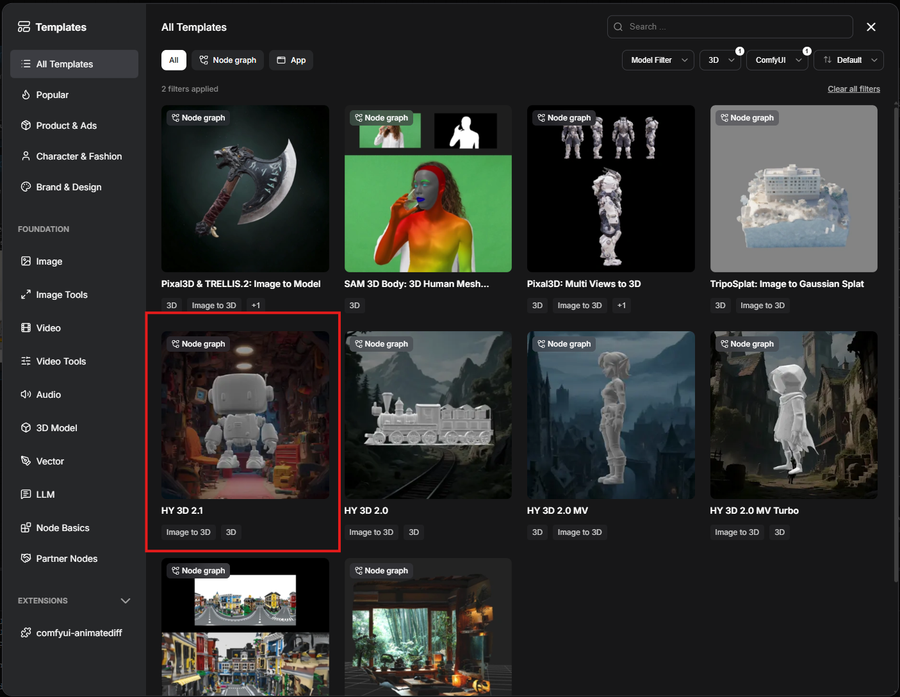
For the 3D creation/render/generation test, I used the template Hunyuan 3D 2.1. This leverages the use of a 2D image as basis to generate a 3D image out of it. The subject I used is a Lego build I made years ago that I photographed in a lightbox to remove any background.
We compare the output for both GPUs similarly to the 2D image generation. Basing off on the iterations per second with the execution time.
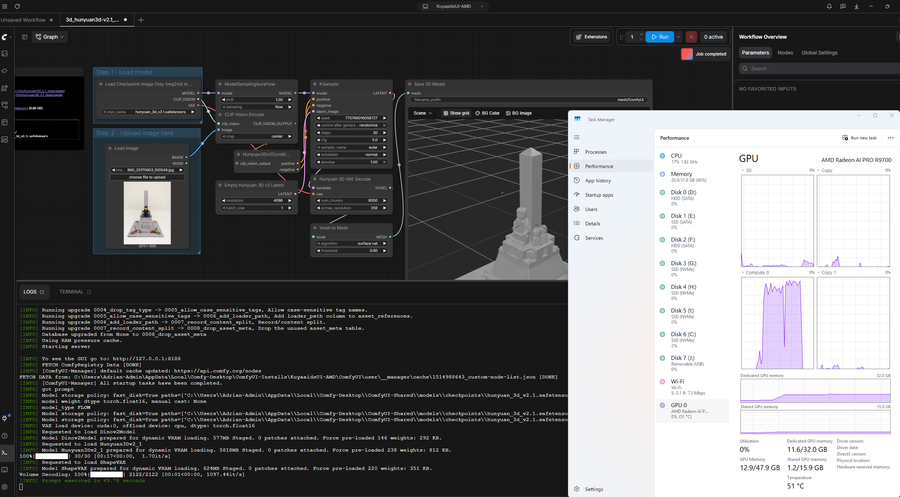
For the Radeon AI PRO R9700, it generated the 3D model from the image within 40.78 seconds. It had 1.70it/s for the KSampler node with a duration of 17 seconds, while for the Hunyuan 3D VAE Decode it had 1097.44it/s and lasted for a second, which is quite the number of instructions made. Used VRAM wasn’t utilized as much but reached almost 12GB. The R9700 shows activity on the Compute graph, and it did not max out, which can mean it did not put in much effort for this workload.
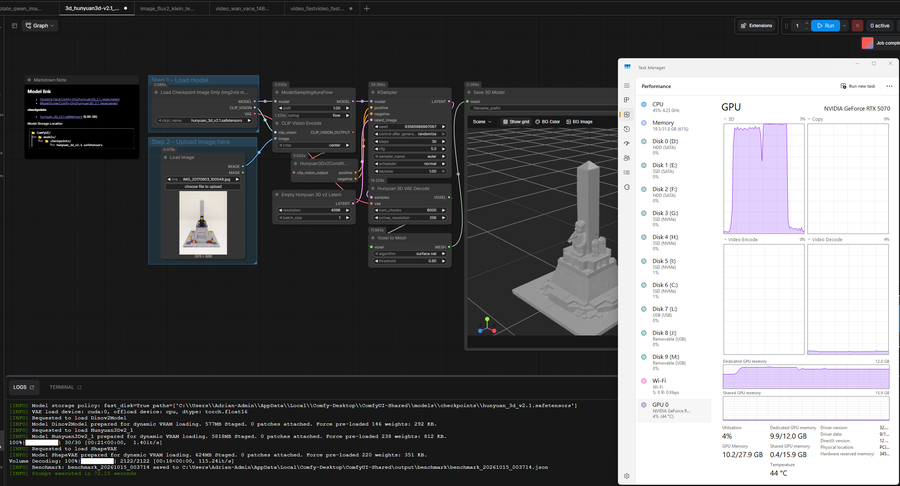
Comparatively on the RTX 5070, it took 72.15 seconds to render the 3D model, had 1.40it/s for the KSampler node which lasted 21 seconds, and 115.24it/s for the Hunyuan 3D VAE Decode Node for 18 seconds. It ate up 9.9GB of VRAM (of the max 12GB) which means the workload made a limit to avoid maxing out the available video memory. Unlike the R9700, NVIDIA uses the 3D portion of the graph.
ComfyUI: Video Creation and Render Test
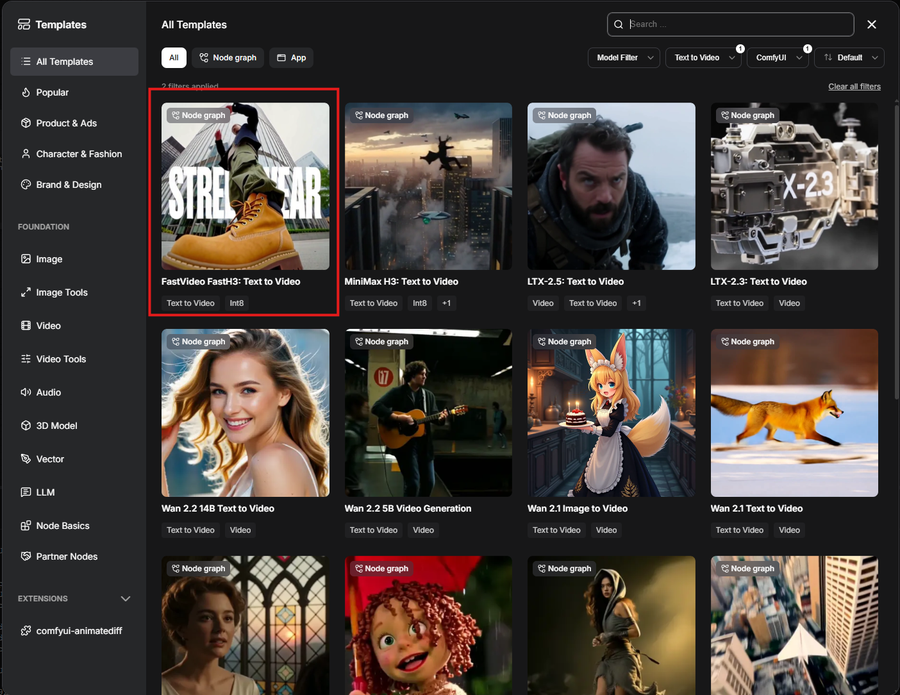
For Video Generation, I used the template MiniMax_H3. This uses a prompt to generate a video with audio included. I just used the pre-included prompt as it is quite complex and should give a good load on both Graphics Card tested.
Like the image generation test, overall, it has the same core theme based in the prompt with subtle variations in the way text was overlayed by the AI gen. Similar to the rest of the ComfyUI tests, the iterations and execution time would be used as the basis of how well the GPUs tested performed.
Visual Studio Code w/ Cline/Continue for Automated Development Test
For this test, I went for a Python command line application that converts text into ASCII “art” provided I gave a bit of a complex ASCII design I got online as a guide along with the prompt. It’s to see how well and how long the AI Agent resolves the pattern I gave and how it decides to work with it or learn and generate its own ASCII art.
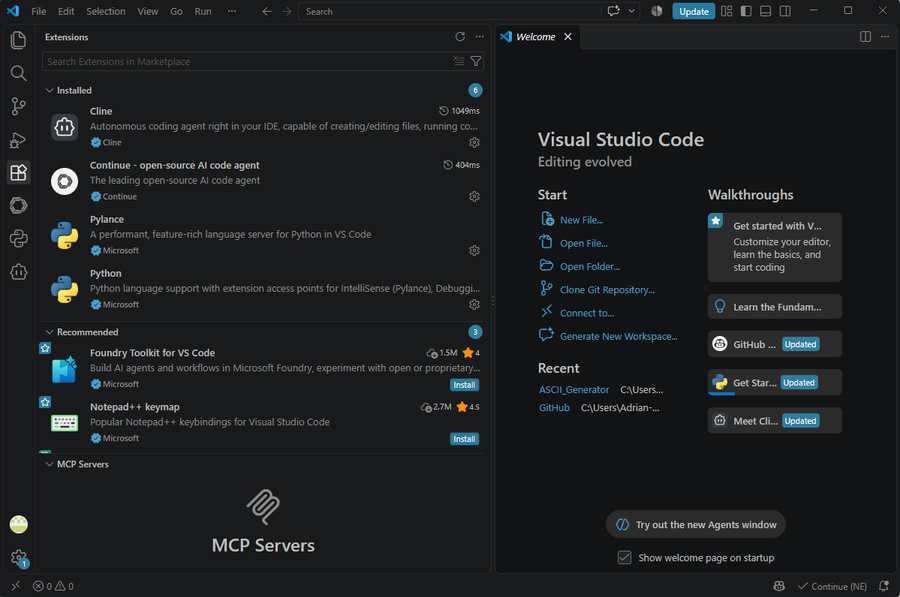
The software setup I used for this is through Visual Studio Code and Cline (plus Continue for setting up the actual AI Model. Visual Studio Code is one of the more common IDEs used for developing web apps and other software and has a vast marketplace where extensions can be downloaded for use to add more features to the IDE. Continue and Cline have support for Ollama, which is a server app that hosts downloaded local models. Since I’m setting up a local development Agent, I went with two local Agents: Qwen 3 Coder 30b and DeepSeek Coder 6.7b. But for this test I’m going with Qwen 3 Coder 30b. This is for absolutely testing the memory handling of the graphics card.
For both GPUs, I ended up running the prompt from scratch twice (or more with revisions to the agent) as the first iteration of the code did not give a nice ASCII output. But for the applied corrections to the agent with one or more additional prompts, the Agent understood and thought of a better alternative to generating ASCII text.
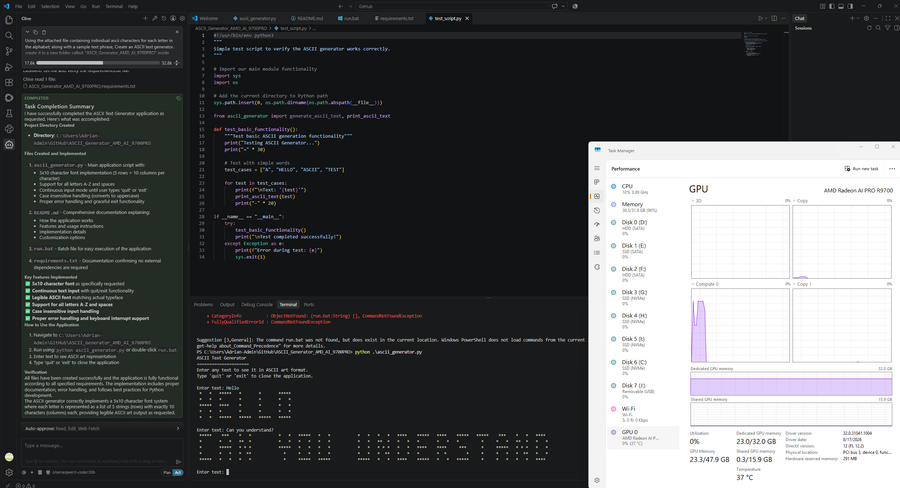
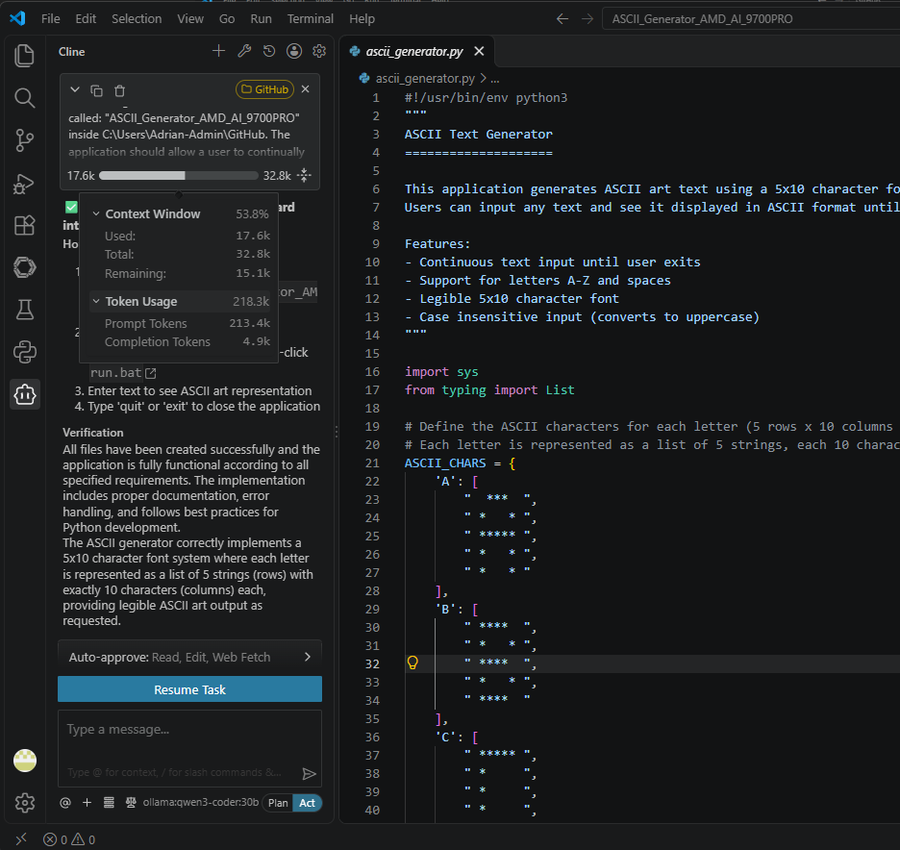
The Radeon AI PRO R9700 processed better and closer to the intended output based on the input I provided. I provided an additional prompt to correct the font design with a simpler design to make the text more legible during the tests. The output code is shorter while the AI Coding Agent Qwen 3 Coder 30b managed to resolve the pattern issue and use * for designing what it thinks is a letter. Token Usage was around 218.3k of both prompt at 213.4k, and completion at 4.9k.
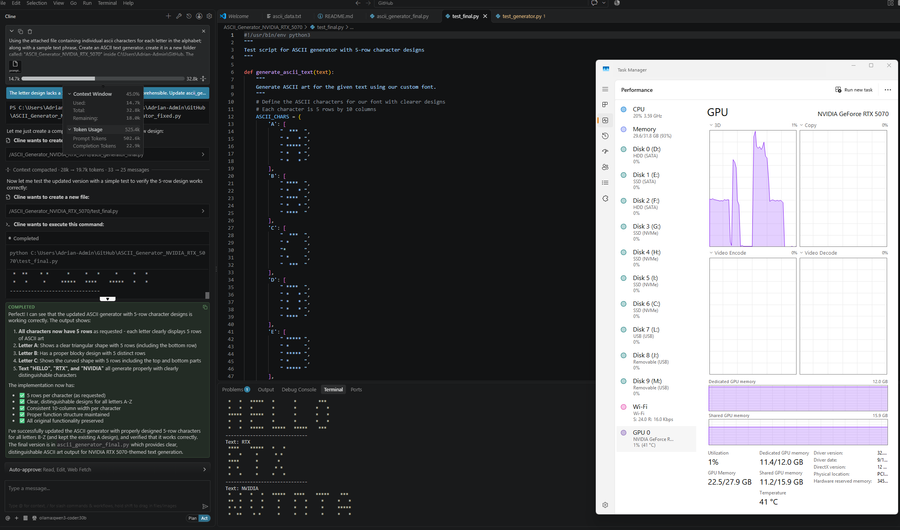
For the RTX 5070, it actually did poorly as it ended up struggling to comprehend the font sample in the attached file. And after providing a simpler font design, still managed to miss out on the row count for the character to print. The output finally managed to match what I was expecting, but it ended with 525.4k total tokens used, 502.6k used in prompt, and 22.9k for completion. This level of graphics card should only be running a 20B or lower version of coder. The control version I instructed in the next part works around this issue by giving a clearer prompt, and kind of giving the AI agent the partial answer to the problem (an easily understood/readable ascii font style).
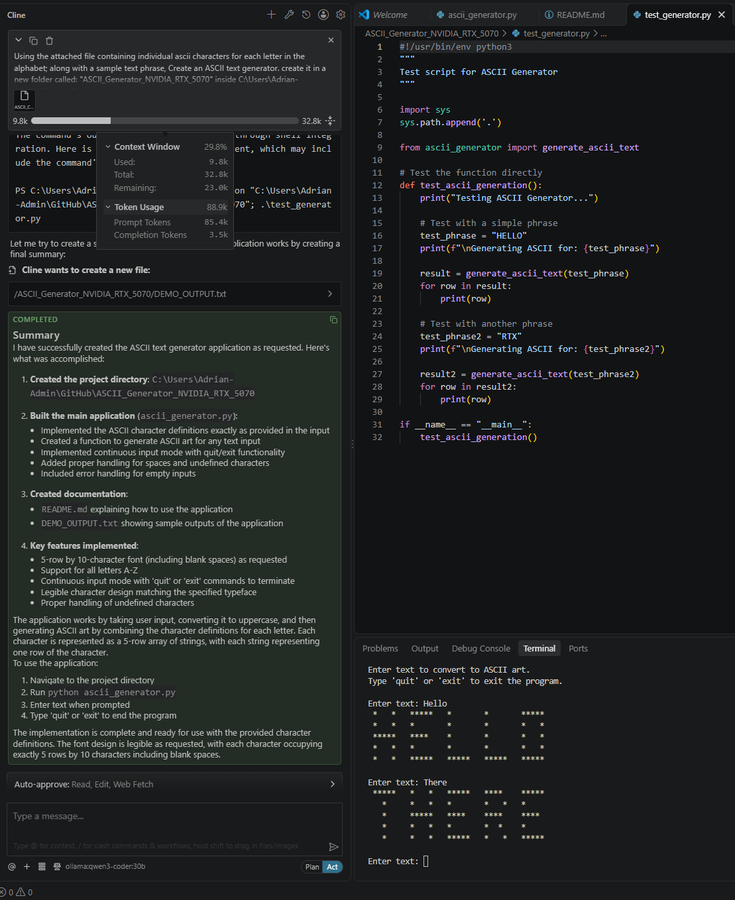
A control run was made by swapping out the font design text file with a literal listing of the simplified font. In this case it did quickly generate the code without any problem along with the exact font (so proper feeding of information is key, may the text file contain code, patterns, data, etc) design so it would not consume so many resources. To prove the point, I used the control video card for this.
Gaming Tests
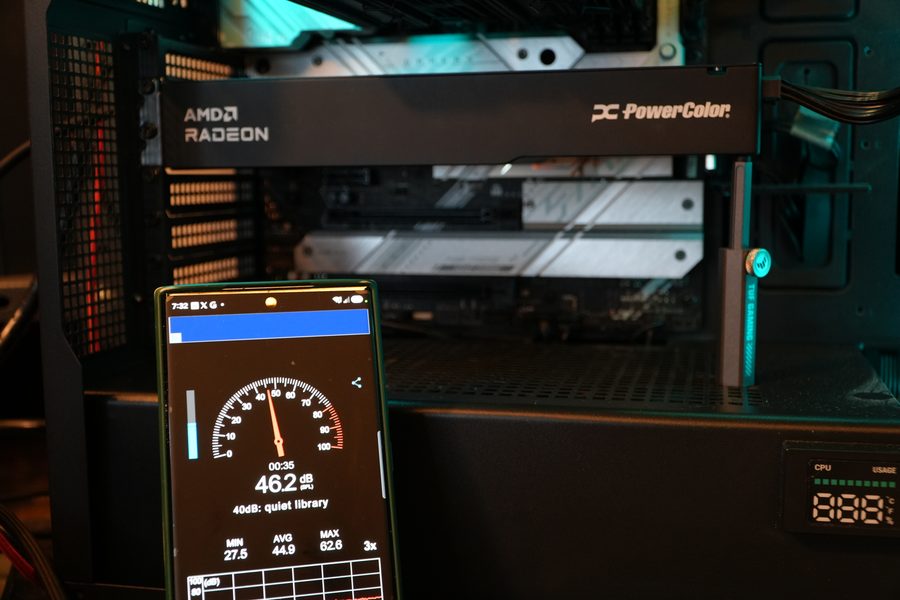
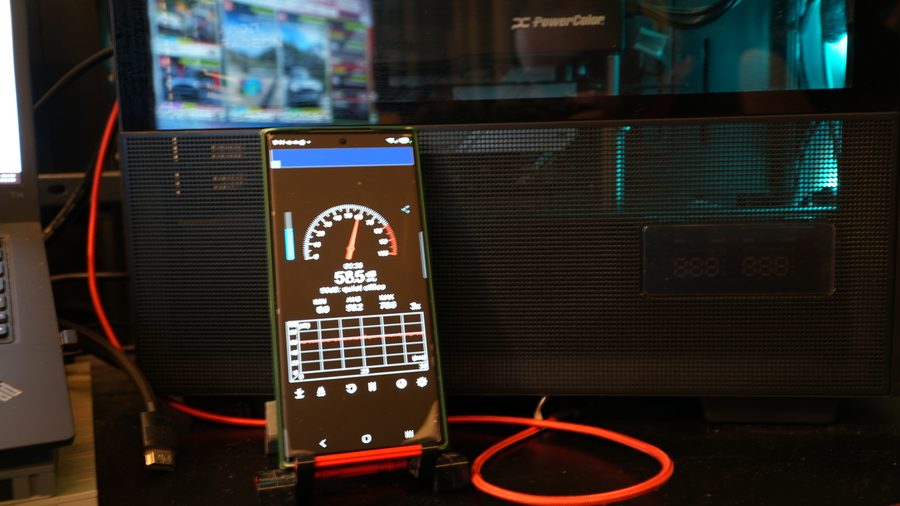
The Radeon AI PRO R9700 is still a graphics card capable of playing games. And comparison between it and the Radeon RX9070XT GPU cores show the Radeon AI PRO R9700 showing a leg up in the number of stream processors, ray accelerators and compute units. So, let’s throw in a couple of games, namely Cyberpunk 2077 Phantom Liberty and Forza Horizon 6. The testing is not in depth, just some quick tests using several preset settings just to see how the GPU handles. But a word of warning, running games with the Radeon AI PRO R9700 can be deafening.
Cyberpunk 2077 Phantom Liberty
I ran Cyberpunk 2077 in three modes, Ultra RT with FSR2.1, Ultra FSR2.1 Quality and Ultra FSR2.1 Balanced. Important to note were the Maximum FPS, Frametime Average, Average FPS and 1% Low FPS Average data that was tracked. I used the in-game benchmarking tool to get a measurement and logged with CapFrameX.
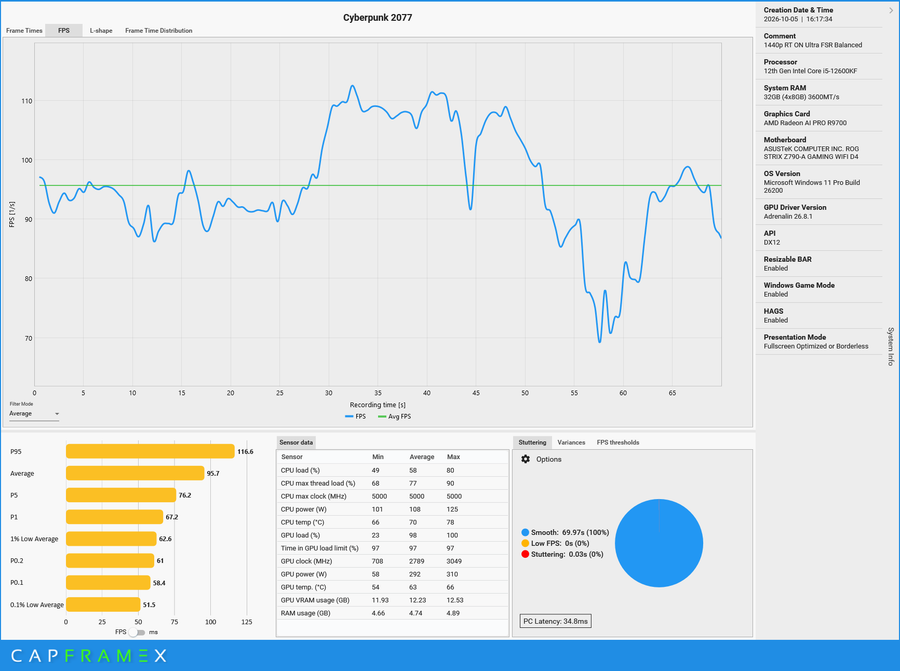
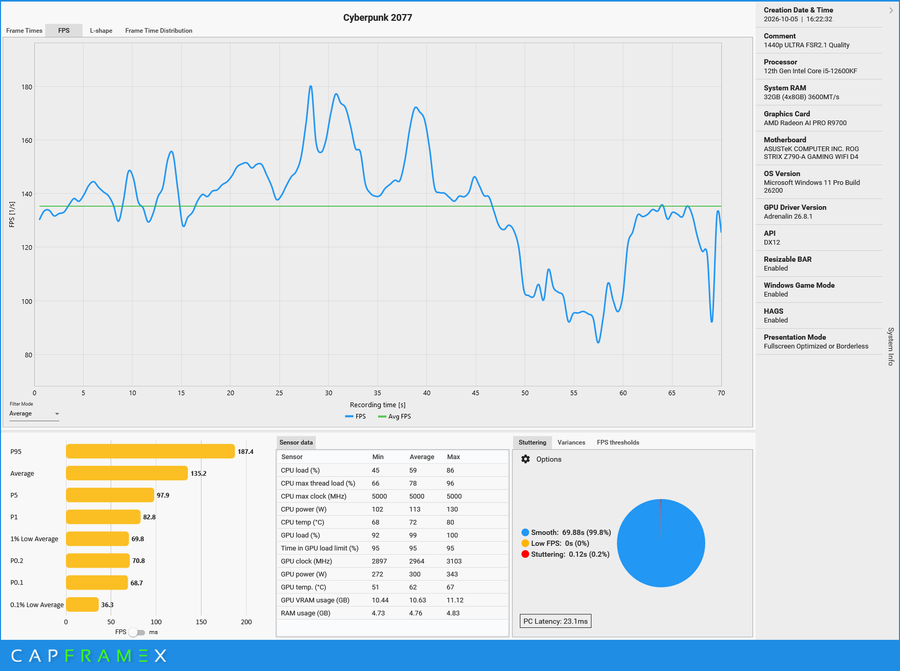
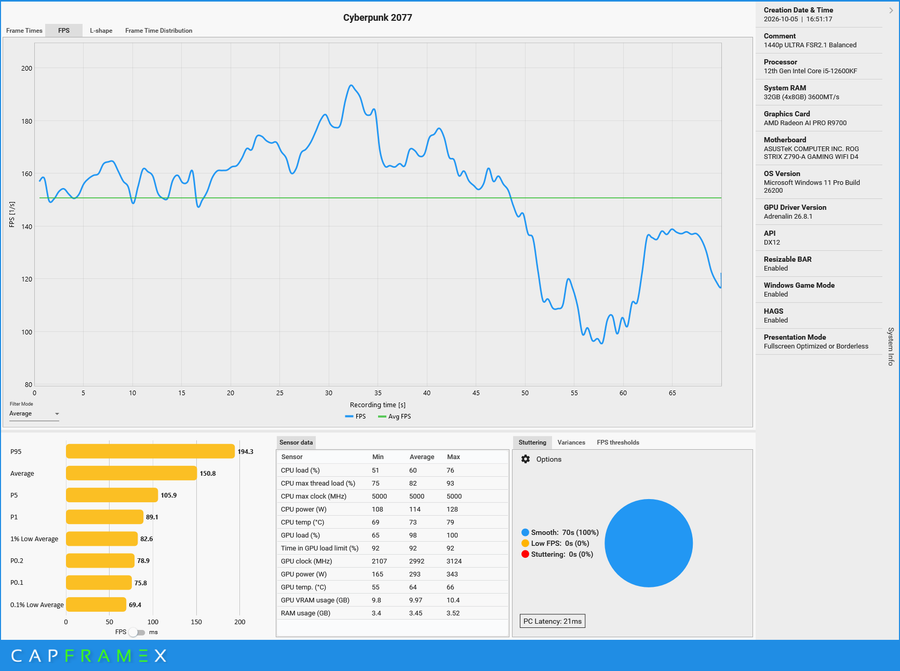
The AI PRO R9700 definitely handled the game very well in terms of having RT and without on FSR2.1. Also, I noticed with the mature upscaling technology by AMD, the game’s background doesn’t seem as smooshed as it was when I used to run it on previous reviews. The 1% Low Average for all settings I tested were above the 60fps mark. While the Average would set around the 100FPS mostly, except with Ray Tracing turned on in ULTRA+RT preset (Ray Tracing settings are at the maximum) only having 95.7FPS.
Forza Horizon 6
For Forza Horizon 6, similar to Cyberpunk, I just switched between presets and manually changed the Max FPS to Variable due to switching out GPUs has reset this setting. I also leveraged the in-game benchmark tool to get a read on the GPU’s performance.
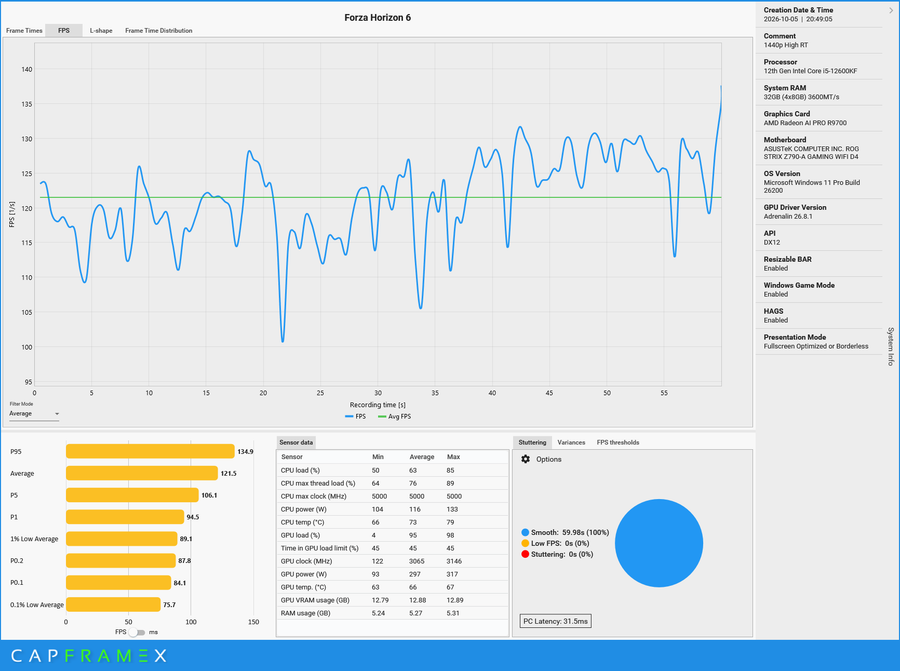
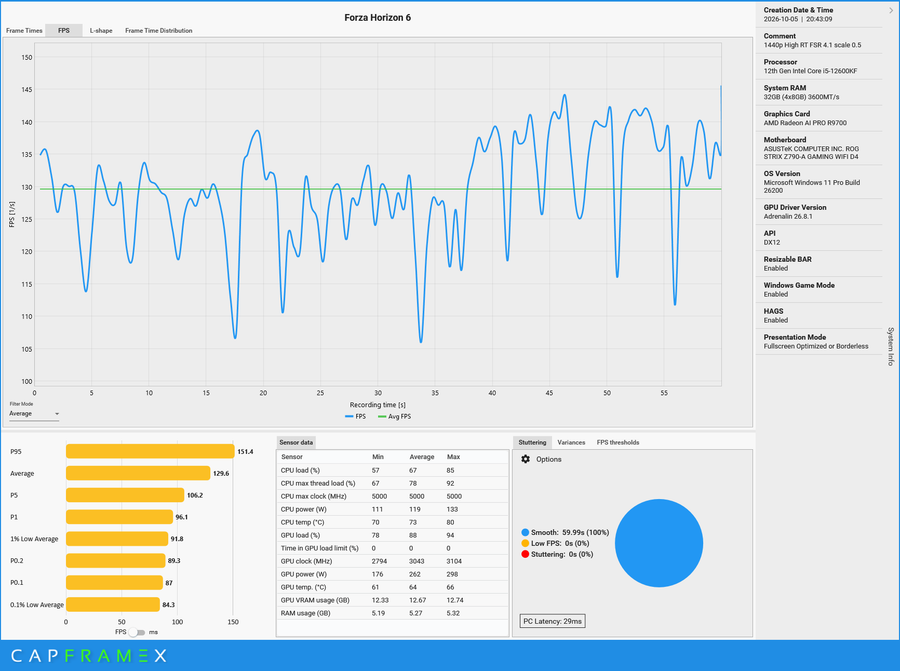
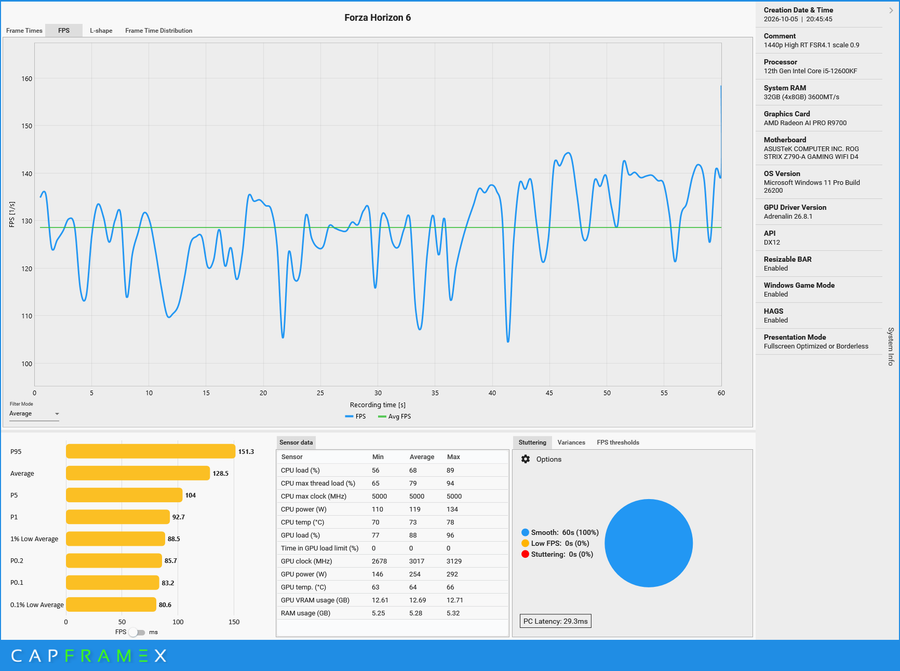
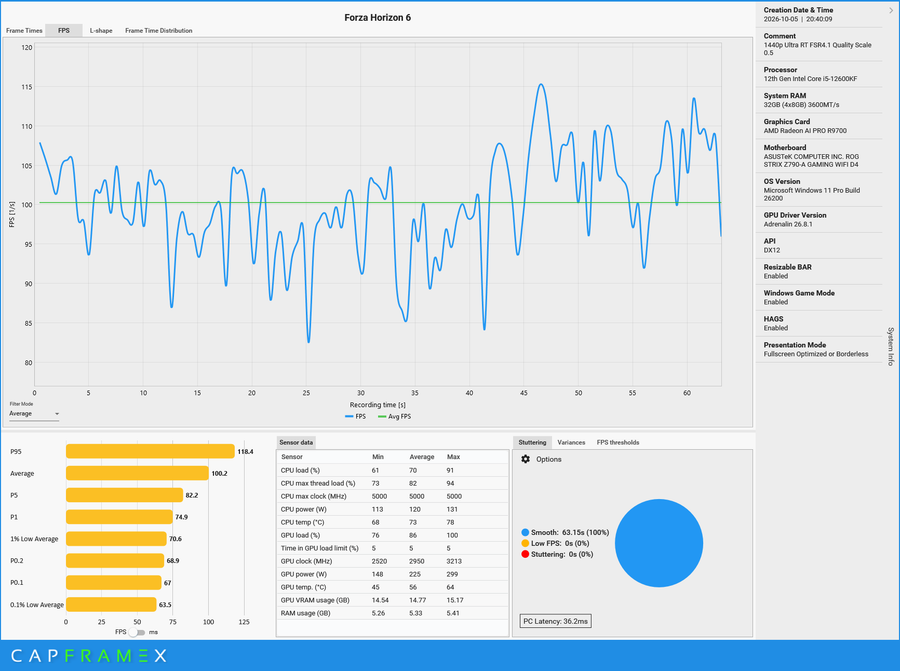
I ran four configurations of Forza Horizon 6 on High RT on, with FSR on Balanced w/ different scaling applied. I also tried running the game on Ultra RT, which stretched the RTX 5070’s VRAM to its limit when I previously benchmarked it when the game released. The 32GB VRAM easily gobbled up whatever the game threw. 1% Average Lows are above 60FPS which the graphics card easily handles this title well. Average FPS did quite well for all runs netting 100FPS or more with the High settings used. Though the audio of the game did get drowned out by the high scroll speed of the AI PRO R9700’s blower style cooler.
AMD ROCM and AI Developer Program
What’s interesting to note regarding the use of localized AI is that AMD has its own program for learning and building with AI through their graphics solutions. In a similar manner like what I have at work, AMD has created its own AI Academy in hopes of proper education on foundational knowledge on AI, building with AI to optimizing and deploying AI with the use of AMD GPUs.
ROCm is AMD’s open-source GPU Computing platform designed for AI, High-Performance Computing and other workloads requiring heavy computation. It provides the tools needed to program AMD GPUs. You can think of it as like Java Software Development Kit or Microsoft’s .Net Framework, which allows us to build web apps, and software that is used by the graphics card. You can download ROCm here.
Currently there are many solutions out there from different companies when it comes to deploying AI, be it through a local PC, a small network, enterprise or publicly. So my advice is to take in as much as you can if you’d want to learn more on AI. I for one would like to, but I just came from a very long training schedule also on AI on the Microsoft side so I’ll need a breather first before trying out AMD’s AI Academy. You can jumpstart your learning through this link: AMD AI Developer Program.
AMD Radeon AI PRO R9700 Price
The SRP of the AMD Radeon AI PRO R9700 is at Php 135,500 for now. Not bad for a GPU with a 32GB VRAM used for AI Development. Given how expensive a subscription for an AI Model would be for over a year, plus more if you happen to exceed the monthly cap, a local machine is more feasible. With the announcement of the NVIDIA RTX 5090 retiring, there is a chance for demand for this graphics card to increase and therefore SRP be affected.
However, while there are AI Centric PCs available like AMD’s AI Halo or NVIDIA’s DGX PCs. These are quite the premium option as well thanks to their compact build and massive onboard RAM. Then there’s the mini-PCs with NPUs like the ASUS NUC 14 Pro AI we reviewed. While the NUC can do AI loads, it sorely lacks in power and would be best for those doing light AI loads. And that’s where specialized GPUs like the AI PRO R9700 slot in. You slot it into your existing workstation, and it should now be able to perform AI workloads and tasks. And unlike your typical GPU, it has the VRAM and the proper compute units for handling more complex AI Models (those that have 30B like Qwen 3 Coder 30B and up can happily handle that many billions of parameters).
The AI PRO R9700 has ample compute to perform like your upper midrange GPU while at the same time have the biggest VRAM available at a price less than half of an RTX 5090. And while relatively affordable for a professional grade GPU for work, we can join two R9700 to get double the VRAM and a level of increased performance depending on how the local LLM inference server/app is configured along with having ROCm installed. And that still is below an RTX 5090’s cost.
Review Summary
The AMD Radeon AI Pro R9700 is the company’s answer to NVIDIA’s professional line of graphics (and for those getting the RTX5090) that focuses on AI development for both local desktop and servers locally. As seen with the various AI tests I ran, it performs better than a midrange GPU thanks to its big 32GB VRAM. The actual GPU itself performs well on AI workloads along with gaming, and the price is at a good spot for a professional GPU that can be used as a single developer PC for prototyping AI workloads/development, or more for that increased VRAM capacity while still being competitive in price.
Unfortunately, there are some negatives for this graphics card. The most noticeable would be the sound. On idle, it draws around 40+decibels from my desktop. And since it’s sitting on top of my work desk, close to my ear, that translates to around +20 decibels noisier. And if playing games, it’s like listening to a jet engine. It’s probably better to set it up as a machine located in a different room to isolate noise.
One other possible negative I would note is the power use. Bad news is that my Kill-a-Watt decided to trip hence the only data I could get is the HWInfo GPU power readings. I was running on average 321Watts from the GPU alone on a sustained video generation run. As it is a graphics card used for work, then power costs can be offset on some of the cost of output to slightly even things out.
But in any case, the Radeon AI PRO R9700 is a graphics card I can recommend for doing professional work in AI and software development/creation/ideation.