

When I went to Taipei last year to cover COMPUTEX 2024, we had a roundtable discussion with ASUS’ executives to discuss about one of their first ASUS AI laptops, the ASUS Vivobook S 15 S5507. He mentioned the history of using PCs starting from the days of DOS, or Disk Operating System. To use the computer, you have to insert the Disk that contains the OS in order for it to run. Once the disk is already inserted, you can go ahead and use the computer by entering commands.
In the mid-80s, the entry of Apple’s Macintosh Operating System and its Microsoft Windows counterpart changed the way we use the computer. These Operating Systems with a graphical user interface (GUI) use a mouse to navigate on the monitor and click on the icons to run a program. This has been the way we’ve been using computers for the next four decades with these Operating Systems updating over time to adapt to the changing needs and behaviors of its users.
Nowadays, major tech companies believe that AI is the future of computing. What they envision is our AI laptops will help us users with our daily tasks by blending intelligence, speed and personalization into out workflow, entertainment and wellness.
We know there are still doubts about using AI laptops, and we understand your hesitations. Let us try to convince you how these ASUS AI Laptops lets you work even smarter and help improve our quality of life.
Table of Contents
Smarter Organization
Having a clean desk and organizing the tools you need along with your ASUS AI Laptop are a must before starting your day. Upon turning on your laptop, you’ll want to know your schedule and tasks for the day. This is where Microsoft Copilot comes in. Think of it as your Secretary like Donna in the TV Series Suits.

To do this, open the Copilot app by pressing the Copilot key on your keyboard then make an inquiry of today’s appointments or tasks. If you have a new appointment for the current day or for another date, you may give instructions to the Copilot app and it will set the schedule for you on Microsoft Outlook. Make sure that your Microsoft Outlook is synced with your Microsoft or Google account to make this work.
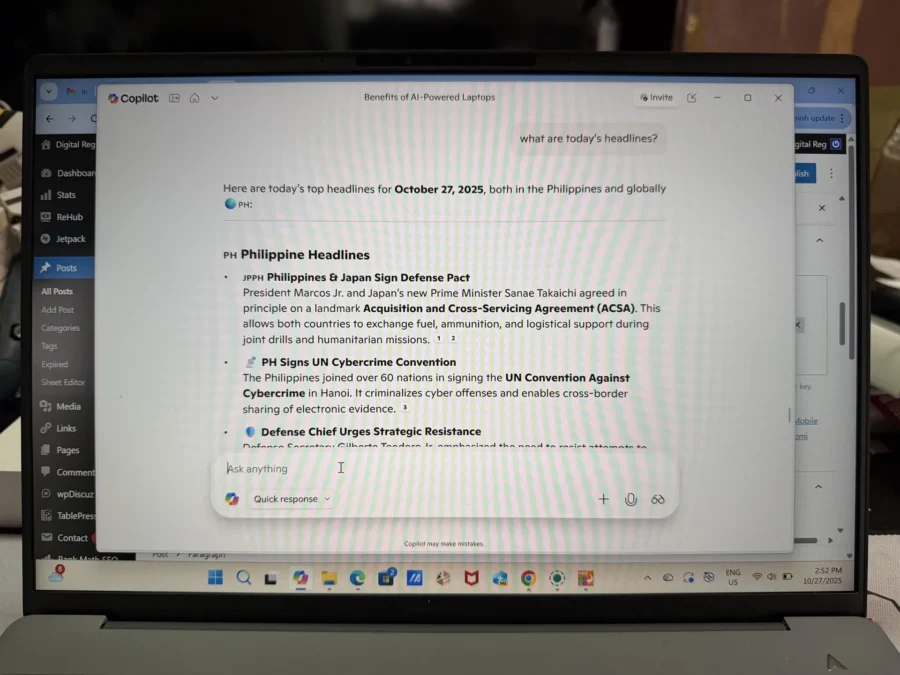
It can also sort your emails in your Microsoft Outlook or Gmail to help you identify to read the important messages first. Didn’t read today’s newspaper? No problem! Ask Copilot to tell you the news headlines for today and it will provide you what’s happening in the local and international news.
Advanced users can have these tasks automated with built-in Windows tools and third-party applications.
Smarter Productivity
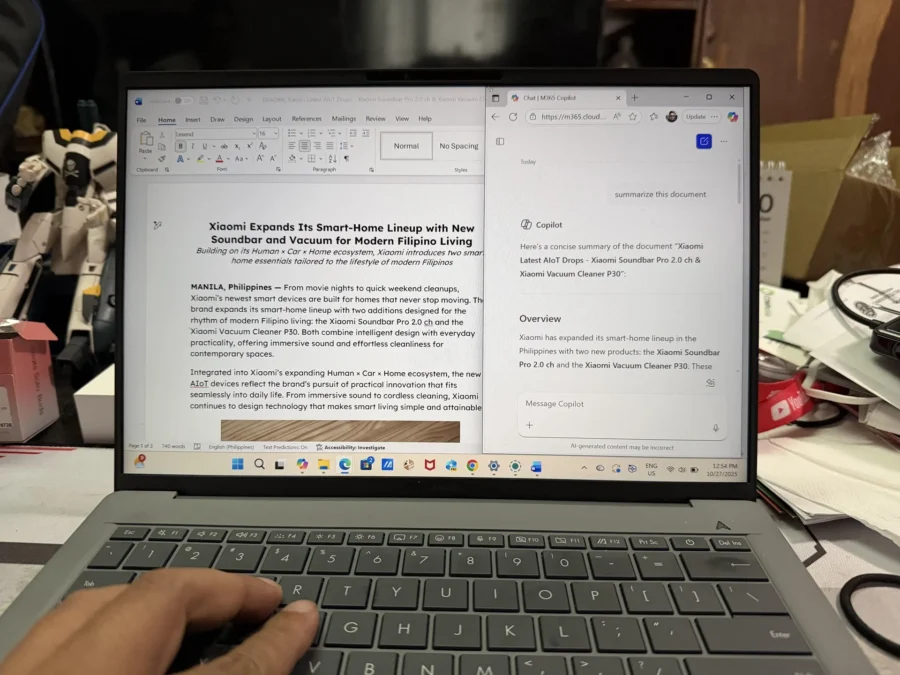
Do you know what TLDR means? It’s ‘Too Long Didn’t Read.’ Yeah, that’s how we treat documents sometimes because it’s just too long and can be boring to read as a whole. Thanks to apps like Microsoft Word, it can summarize your documents thanks to the Copilot app.
Same thing with emails. Microsoft 365 CoPilot can summarize your Microsoft Outlook emails so you can skim on them quickly. Gmail Workspace subscribers can also enjoy this feature on your web browser.
What can annoy attendees in a video call? NOISE! That’s the thing of the past now that ASUS AI Laptops are equipped with ASUS AI Noise Cancellation. Online meetings will be much clearer to understand with all the background nuisance being cancelled out.

But what if you’re having an online video call with someone who doesn’t know English? Thankfully, Copilot came up with real-time captioning and translations during video conference calls using Microsoft’s Live Captions feature. It is able to translate 44 languages into English, so no matter which nationality you talk to, ASUS AI Laptops got you covered.
Oh, and when you’re done with your meeting, you can have the minutes of the meeting transcribed via CoPilot, Microsoft Teams and Microsoft Word. CoPilot can transcribe Microsoft Teams meeting real time and provide summarized key points and suggested action items. If the meeting was recorded via audio saved as an mp3 or mp4 file, you can upload the file to Microsoft Word and use the Transcribe feature.
Smarter Creativity
As a Technology writer for the past two decades, I tend to procrastinate because I always experience writer’s block. Sometimes, the material I came up with doesn’t seem good enough or it doesn’t reach my standards.
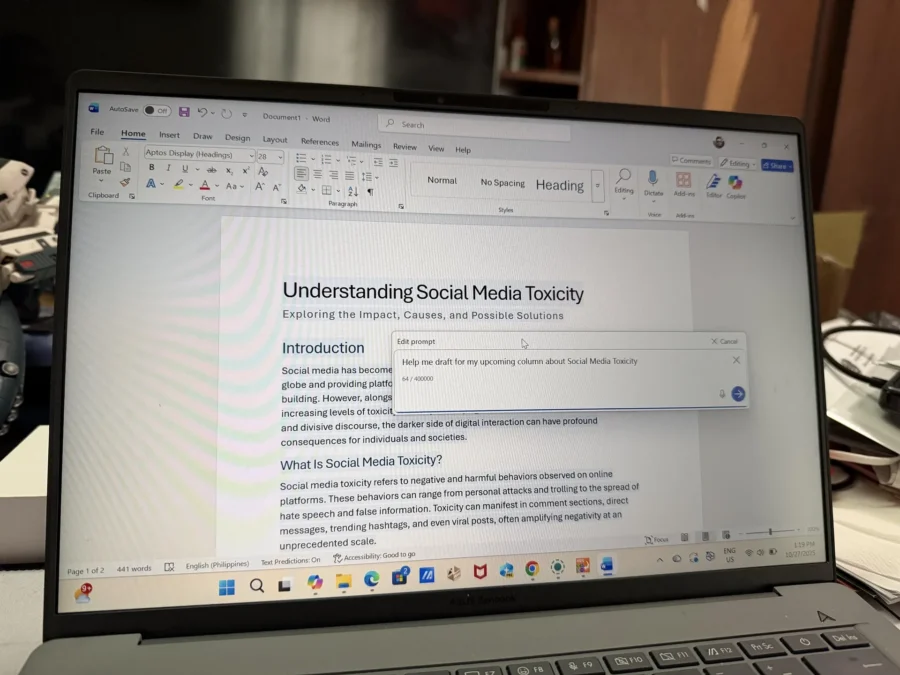
Thankfully, there are apps like Copilot, AI Cocreator and Recall feature. Copilot can help you brainstorm, outline and rewrite with MS Word, Edge browser and Notepad. The same can be done with AI Cocreator and its advantage is you can use it even when you are offline. Recall allows you to search your previous documents and revisit your works for inspiration.
Creators dealing with multimedia production can also benefit from ASUS AI Laptops from real-time video rendering, image enhancement, and animation smoothing thanks to AI-optimized GPUs like Intel Arc and NVIDIA RTX. Creative applications such as Blender, Adobe, Wondershare Filmora, and many others now have multiple AI features that can help creatives with more inspirations and at the same time save large amounts of time working on a project.
Smarter Security and Privacy
Our ASUS AI Laptops are well secured. They have a way to detect and prevent security threats by combining hardware, software and AI-driven features to keep our files safe.
First, it has a BIOS password protection for an additional layer of security. This can be setup before anyone tries to mess up with your laptop. Second, it has a hardware-level security called Microsoft Pluton which protects sensitive data like encryption keys and credentials. It is able to receive regular firmware updates from Microsoft so you can be assured that even the latest security threats are prevented.

On the software side, there is Windows Hello with AI. ASUS AI Laptops all have Windows Hello which uses facial recognition or fingerprint sensors for a fast and secure login.
Lastly, AI Privacy Features such as Adaptive Lock and Dimming lets your AI camera detect whether you are present or not. It automatically locks or dims the screen to protect sensitive information. Also, there may be several instances when people can snoop over your shoulders to see what you have on your screen. The Multi-Person Detection can prevent that by blurring or hiding content when other people are nearby.
Smarter Power Management

Our ASUS AI Laptops have built-in NPUs (Neural Processing Unit.) The NPU handles AI-specific functions, such as those within the Copilot suite, without relying heavily on the CPU. This way, the system conserves energy while providing advanced features.
Additionally, ASUS AI laptops can learn user patterns to better optimize power settings over time, maximizing battery life for how you actually work.
Smarter Quality of Life

With everything mentioned above, you can be assured ASUS AI Laptops will help you get things done at work quickly and give you more time to relax and spend quality time with your family.
Heck, you can even use these ASUS AI Laptops with your family! Organize shopping lists, watch Korean TV series with AI translate, search for movie schedules or a new vacation spot with Copilot. There are so many things you can do with your family with an ASUS AI Laptop.
Try one of the ASUS AI Laptops available at your favorite IT retail stores and see how it can make you to work smart and have a smarter quality of life.
To know more about ASUS AI Laptops, click here: https://www.asus.com/ph/content/asus-ai-pc/